 How to Open DevTools
You can open DevTools in several ways:
- Right-click on any element →
Inspect - Keyboard shortcuts:
- Windows/Linux:
Ctrl + Shift + IorF12 - macOS:
Cmd + Option + I
- Windows/Linux:
 Overview of the Main Panels in DevTools
Here are the most commonly used tabs/panels:
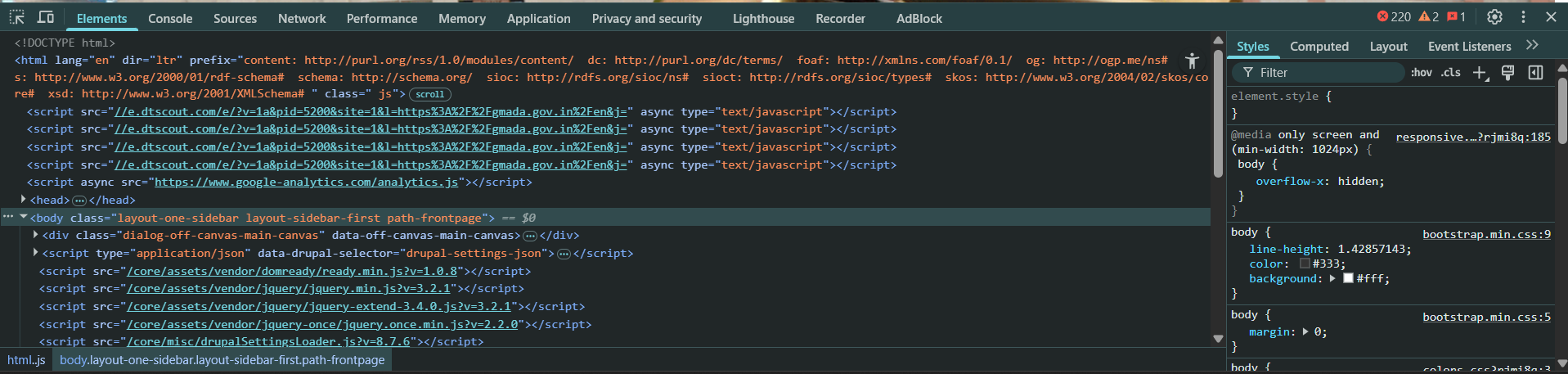
1. Elements
- What it does: Lets you inspect and edit the HTML and CSS of your page live.
- Use cases:
- Modify styles on-the-fly
- Test UI changes
- See which styles override others
- Copy selectors, view computed styles
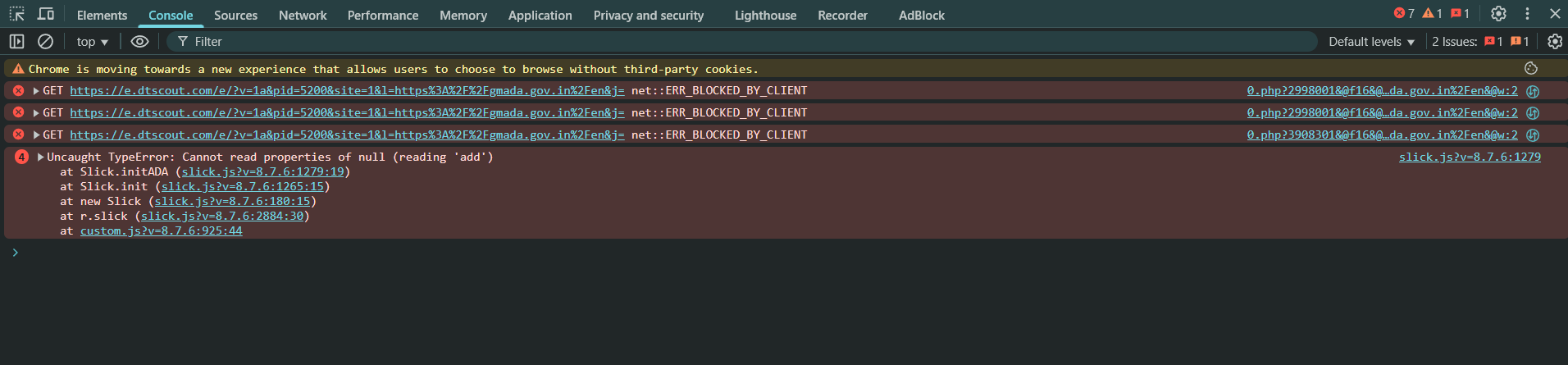
2. Console
- What it does: Shows JavaScript logs, errors, and lets you run JS code manually.
- Use cases:
- Debug scripts with
console.log,console.error, etc. - Try JavaScript snippets
- Interact with DOM via JS (
document.querySelector, etc.) The DOM is a programming interface for HTML and XML documents. When a browser loads a web page, it parses the HTML and creates a tree-like structure of objects that represent elements on the page. This tree is the DOM. Think of it as a live, interactive blueprint of your web page that JavaScript can read and manipulate.
- Debug scripts with
Console Filter Options – The Console Sidebar filter in Chrome DevTools, helps you organize and filter the types of messages shown in the Console tab — especially useful when your app logs tons of data.
 Messages: Shows all messages (a combination of errors, logs, warnings, etc.). This is the default view and the most verbose.
User Messages: Only shows console.log(), console.info(), and console.debug() that were explicitly written by developers.
Errors: Shows only console.error() messages or thrown JavaScript errors.
Warnings: Shows only console.warn() messages.Typically used for non-breaking issues or potential risks.
Info: Shows only console.info() messages. Slightly less noisy than log, often used for status updates.
Verbose: Shows everything, including things that normally don’t show up like: Internal debug messages, Detailed fetch logs, Framework-level debug info, Great for in-depth debugging, but can be noisy.
 Other Powerful Features of the Console Tab
Live Expression Watch
Click + beside “Live Expression” to monitor a variable in real time.
Great for seeing values change while your app runs.
Run JS Directly
You can execute any JavaScript code in the console.
Console Commands ($0, $_, etc.)
$0 → the element currently selected in the Elements tab.
$_ → last evaluated expression result.
$1, $2, … → previously selected elements in reverse order.
$$(‘selector’) → shorthand for document.querySelectorAll()
Group and Trace Logs
console.group(‘Label’) / console.groupEnd() → organize logs
console.trace() → shows a stack trace of where a log was called
Timers
Great for profiling performance.
Clear Console
Use the  icon or Ctrl + L / Cmd + K to clear the log output.
Preserve Log
Enable this option to keep logs even after page refresh — useful for debugging page loads.
Pro Tips
Use console.table() to display arrays/objects in table format.
Use custom style
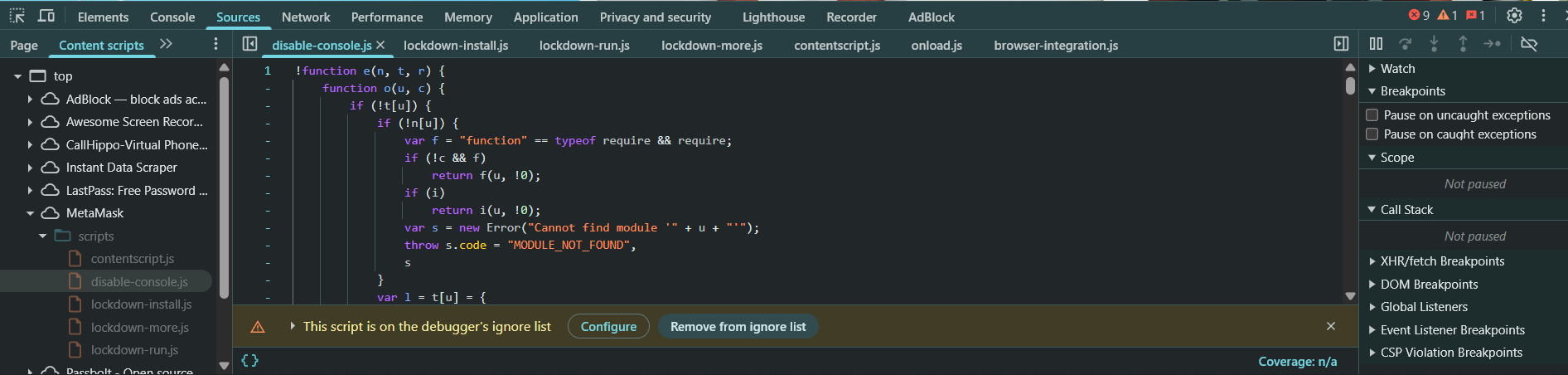
3. Sources
The Sources tab in Chrome DevTools, which is a powerful live code editor and debugger for JavaScript and frontend developers. Let’s break down what all those sections mean so you can use them effectively is split into 3 main parts:
- What it does: View and debug JavaScript files.
- Use cases:
- Set breakpoints
- Step through code line-by-line
- Watch variable values
- Use the Call Stack and Scope for debugging
 LEFT: Page & Workspace (File Navigator)
- Page Tab: Shows all the resources loaded by the current webpage, These are files that the browser loaded from the server. You can click any JS file here to open it in the middle panel and set breakpoints.
- HTML
- JavaScript
- CSS
- Images
- Fonts
- Filesystem / Workspace (Optional) : You can map your local project folder here.
- Allows live-editing and saving changes from DevTools directly to your local files — very handy for local development.
- Requires manual setup (right-click and “Add folder to workspace”).
 MIDDLE: Code Editor
Displays the source file you’re currently inspecting. Here’s where you can:
- Set breakpoints
- Add logpoints
- Edit files (temporarily)
- See in-line execution flow during debugging
RIGHT: Debugging Tools
This is where the magic of debugging happens. Let’s break each section down:
- Watch
- You can manually enter expressions or variable names to monitor.
- Helps you track values live as you step through code.
- Breakpoints
- Lists all your active breakpoints.
- You can disable or delete them from here.
- Super useful for keeping track of complex debugging sessions.
- Call Stack
- Shows the stack of functions that led to the current line of execution.
- Helps you trace how a function was called — like a breadcrumb trail.
- Scope
- Shows all variables currently in scope (local, global, closure).
- Lets you inspect the real-time values during debugging.
- Break on… (Right-click DOM in Elements tab): Triggers breakpoints when:
- DOM is modified
- Attribute is changed
- Element is removed
- Very handy for debugging DOM-based behavior.
 Typical Debug Workflow
- Open Sources tab
- Navigate to
main.jsor similar from the Page panel - Set a breakpoint on a suspicious line
- Trigger that part of the code (e.g., click a button)
- When it pauses, check:
- Watch variables
- Call Stack
 Scope
Scope- Step through (
F10,F11, etc.)
- Fix or tweak logic based on what you see
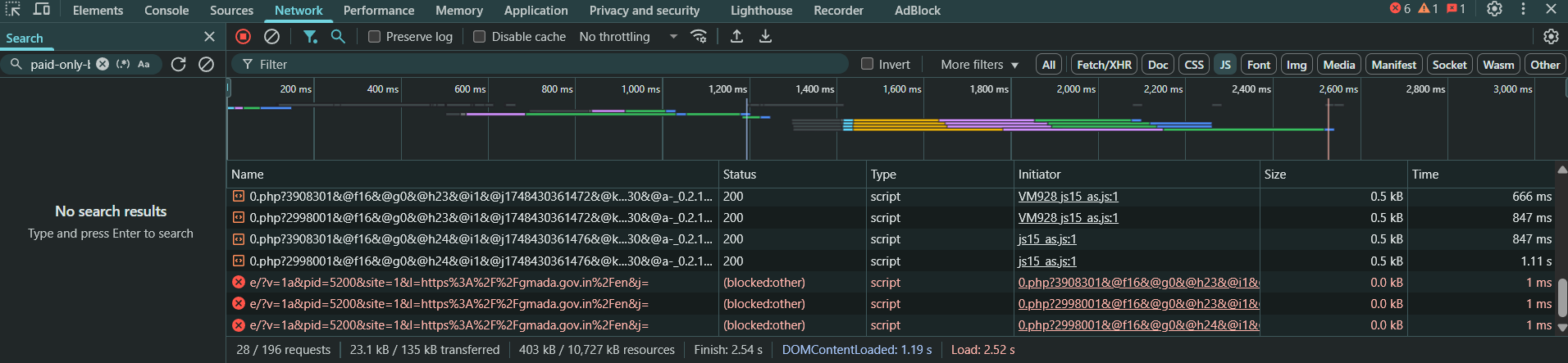
4. Network
- What it does: Logs every HTTP/HTTPS request made by the page.
- Use cases:
- Inspect API calls (headers, responses, payloads)
- Analyze loading speed
- Detect failed resources (404s, 500s)
- Check caching (status code
304)
5. Performance
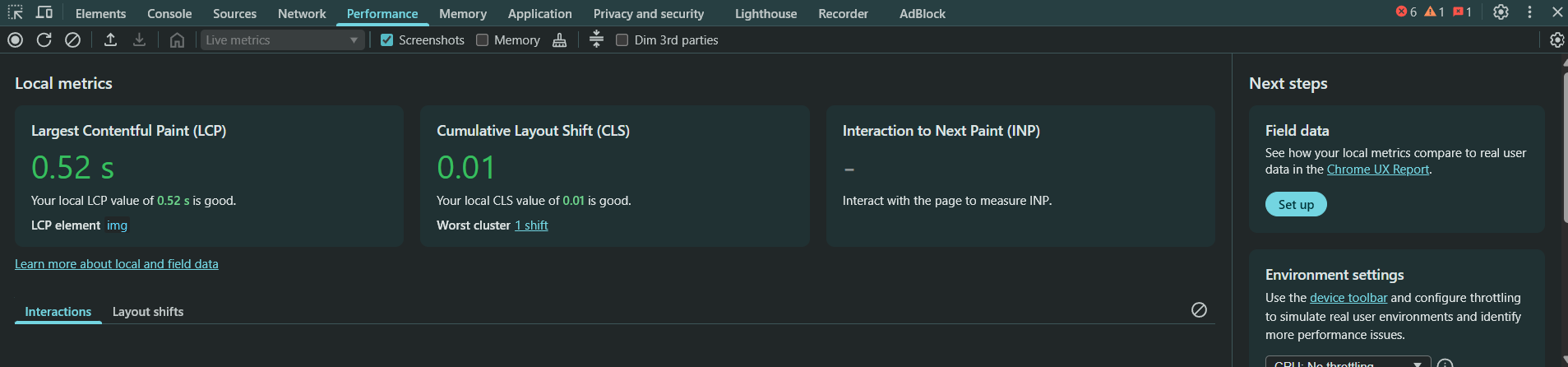
- What it does: Records and analyzes the page’s runtime performance.
- Use cases:
- Identify slow parts of your app
- Analyze FPS, scripting, rendering
- Spot memory leaks or jank
6. Application
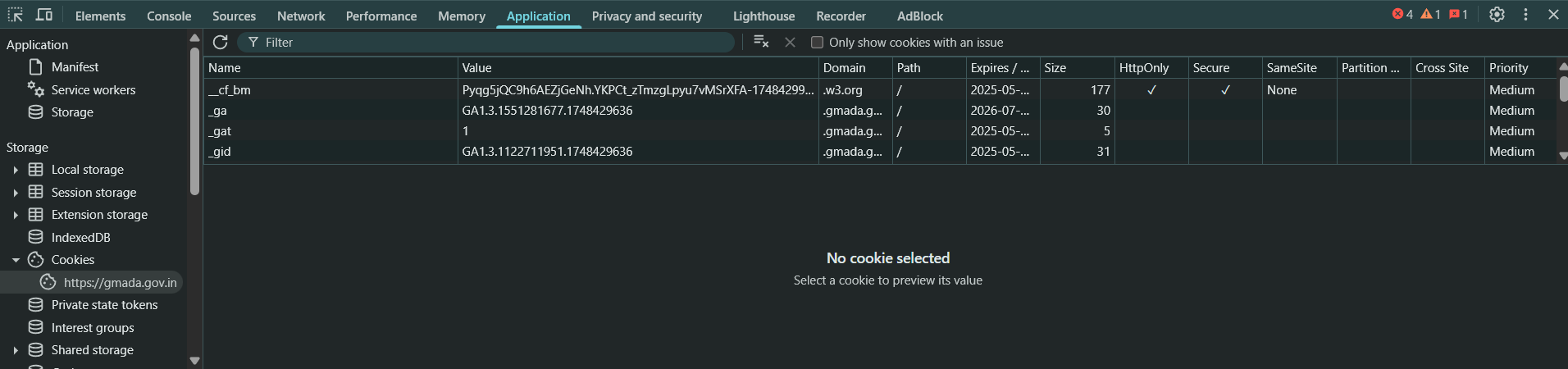
- What it does: View client-side data (cookies, localStorage, sessionStorage, IndexedDB, service workers).
- Use cases:
- Clear site data
- Test how your app handles stored data
- Inspect PWA service workers, cache
7. Security
-
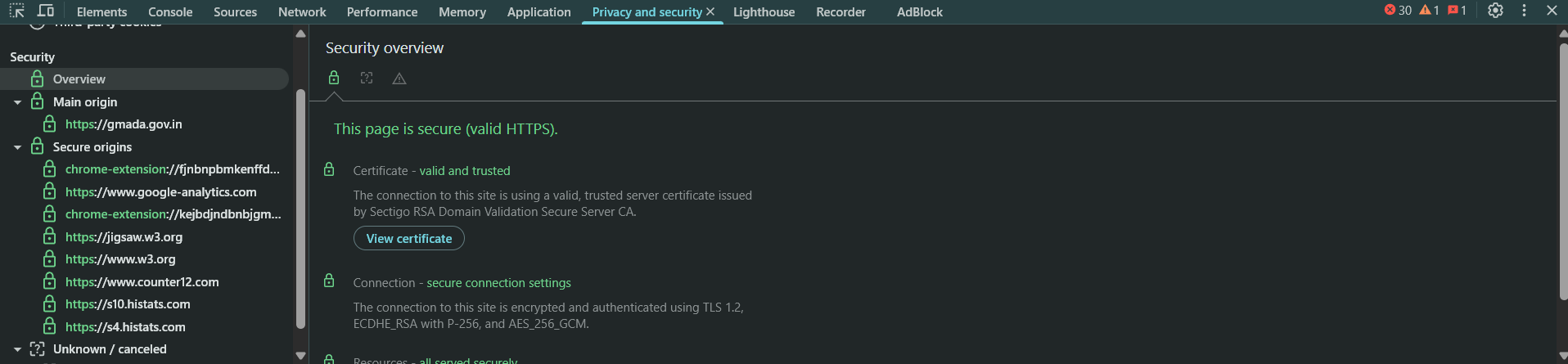
- What it does: Shows TLS/SSL info, certificate details, and mixed content warnings.
- Use cases:
- Ensure HTTPS
- Check for insecure resources
8. Lighthouse
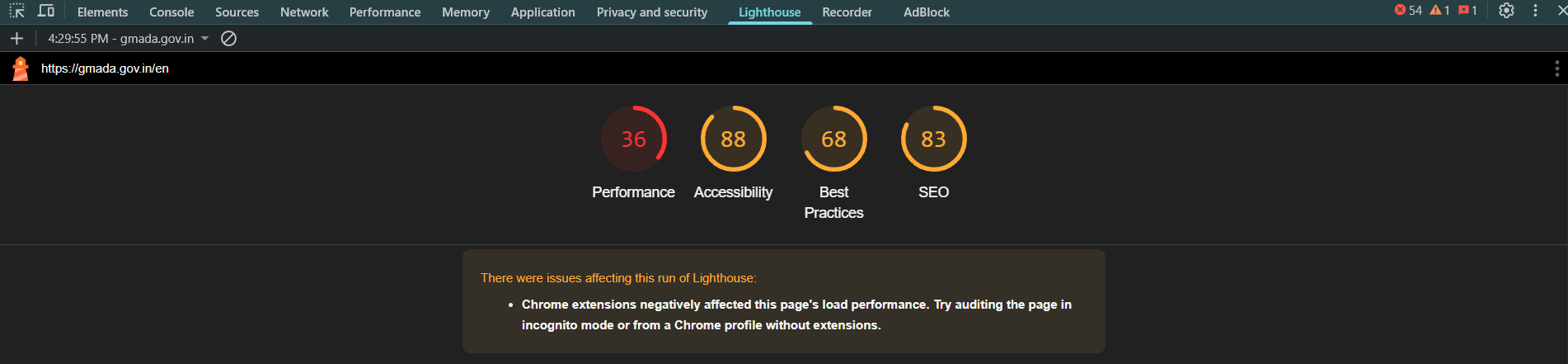
- What it does: Run audits for performance, accessibility, best practices, SEO, and PWA.
- Use cases:
- Analyze how to improve page speed
- Get a performance score
- See PWA readiness
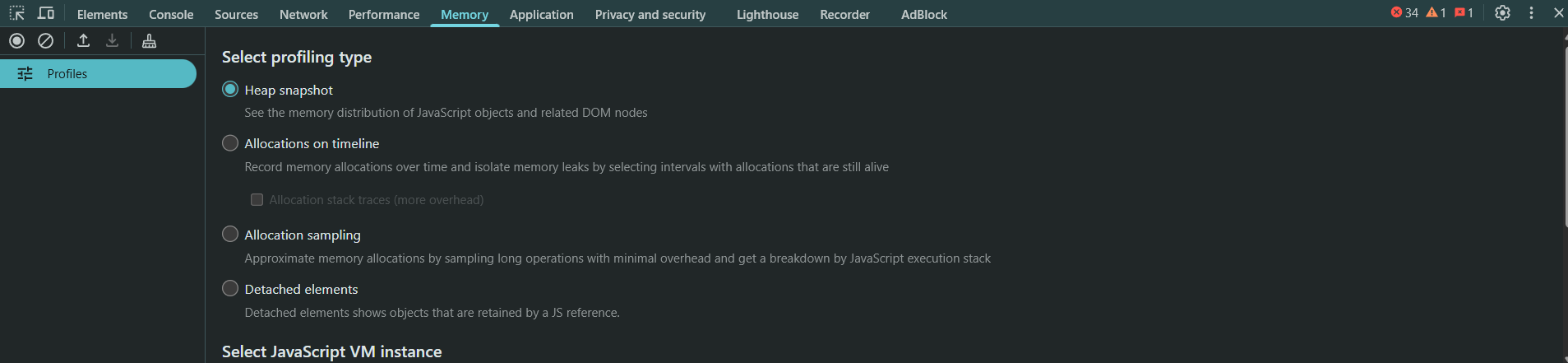
9. Memory
The Memory tab helps you:
- Detect memory leaks
- Monitor JavaScript heap usage
- Understand object allocations over time
- Analyze how long objects stay in memory
- Clean up your app to improve performance and responsiveness
Heap Snapshot
- Takes a snapshot of the memory heap.
- Lets you inspect which objects are in memory, how much memory they’re using, and what is keeping them from being garbage collected.
Good for:
- Finding memory leaks
- Identifying large or unexpected object allocations
- Analyzing retained size and object trees
Allocation Instrumentation on Timeline
- Records memory allocations over time with time correlation.
- Helps you see when and where memory was allocated.
Good for:
- Watching for growing memory use over time
- Spotting allocations tied to specific user actions
3. Allocation Sampling
- Takes samples of memory allocations.
- Lightweight and faster than full heap snapshot.
- Gives a general sense of which functions are allocating memory and how much.
Typical Workflow for Debugging Memory Leaks
Here’s how you’d typically use the Memory tab to find a leak:
Step 1: Take a Baseline Heap Snapshot
- Open the Memory tab.
- Select “Heap snapshot”.
- Click “Take snapshot”.
Step 2: Interact with the App
- Trigger the functionality that you think is leaking (e.g., opening a modal, adding a DOM node, using a component).
Step 3: Take Another Snapshot
- After performing the suspected action, take a second snapshot.
- Compare object counts and retained sizes with the first snapshot.
Step 4: Look for Detached DOM Trees or Unexpected Objects
- Search for “detached” in the snapshot.
- These are DOM elements that are no longer in the DOM tree but still in memory = memory leak!
- You can also look at “Retainers” to see what is holding references to leaked objects.
Step 5: Bonus Tips 
- Use device toolbar (
Ctrl + Shift + M) to simulate mobile devices and test responsiveness. - Right-click →
Break on...to debug DOM changes (like deletions, modifications). - Use the Command Menu (
Cmd/Ctrl + Shift + P) for quick access to hidden features.
Step 6: Example Workflow: Let’s say you’re debugging a broken button click:
- Go to Elements, locate the button and check if it’s visible and not disabled.
- Switch to Console, log messages or check for JS errors.
- Use Sources to place a breakpoint in your click handler.
- Open Network to see if clicking sends a request.
- Use Application to ensure any necessary data is stored correctly (cookies, localStorage).
- Run a Lighthouse audit to check performance or accessibility.
Artificial intelligence is no longer a futuristic concept-it’s the new digital backbone of industries across the globe. But as AI becomes smarter, the infrastructure required to connect it to the real world grows more complex. Developers, product teams, and enterprises alike are facing an explosion of tools, APIs, and data sources that don’t speak the same language. Enter the Model Context Protocol (MCP): a groundbreaking open standard designed to simplify and unify the way AI systems interact with external services.
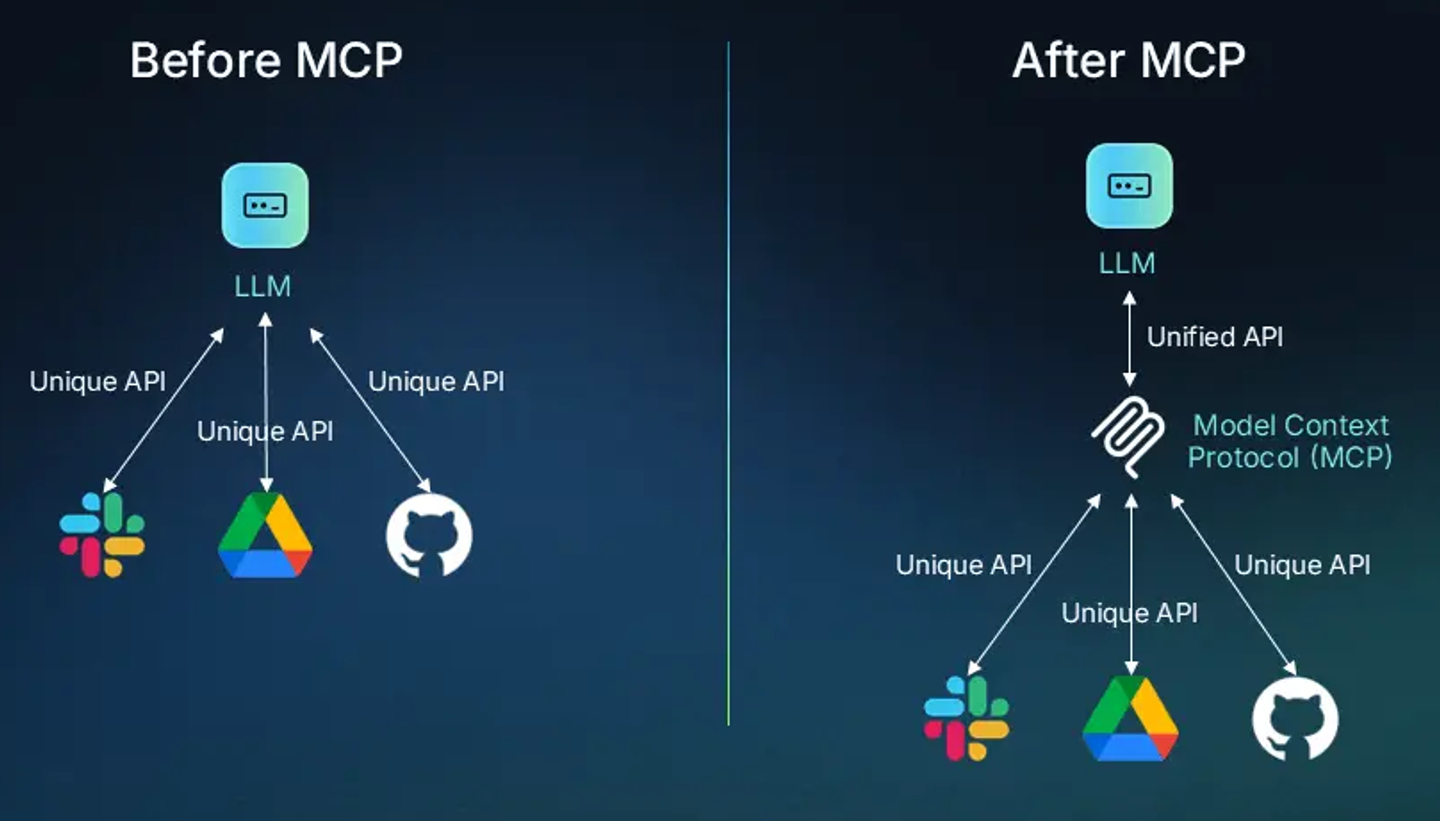
Pioneered by Anthropic, MCP offers a plug-and-play framework that lets large language models (LLMs) like Claude or GPT seamlessly connect to live systems-be it Google Drive, GitHub, customer databases, or supply chain APIs. It’s being hailed as the USB-C for AI: one protocol to bridge models, tools, and services in real time, securely and scalably.
Nowhere is the need for such integration more urgent-or the opportunity greater-than in California. From the innovation hubs of Silicon Valley to the creative engines of Hollywood and the logistics corridors of Long Beach, businesses across the Golden State are leveraging AI like never before. But without a streamlined way to connect these powerful models to live tools and data, their potential remains bottlenecked.
In this article, we’ll take a deep dive into how the Model Context Protocol works, why it matters, and why California’s tech, media, e-commerce, and healthcare leaders are perfectly positioned to capitalize on its transformative capabilities.
What is Model Context Protocol (MCP) and Why It Matters
A Standard, Not a Tool – The Model Context Protocol is not a standalone tool. It’s a protocol; a set of rules and structures that define how AI systems discover and interact with external tools, services, and context. Its role is foundational, enabling AI applications to perform real-time actions and queries in a consistent, scalable manner. Solving the “Integration Mess – Prior to MCP, developers faced the N x M problem: connecting N AI applications to M external systems meant building and maintaining NxM custom integrations. Each connection required unique code, authentication handling, and maintenance logic. The result? Brittle systems, inconsistent performance, and painful scaling. MCP simplifies this dramatically with a universal interface. The USB-C Analogy – Much like USB-C standardized hardware connectivity across devices, MCP standardizes AI’s connection to tools and data sources. Instead of bespoke integration layers for every tool, developers can build or plug into MCP servers that handle the complexity, allowing AI applications to use tools interchangeably and dynamically. Empowering LLMs – LLMs like Claude or GPT are powerful but fundamentally limited; they can only generate responses based on static training data and lack real-time, contextual awareness. With MCP, these models can now interact with live systems; retrieving inventory from an e-commerce API, querying GitHub commits, sending emails via Gmail, and more. Benefits at a Glance
- Custom Integrations: Build once, deploy everywhere. Easily integrate Slack, Google Drive, or any other tool into an MCP-enabled application.
- Portable Tool Sets: Create and share reusable prompt templates, tool definitions, and workflows across IDEs and apps.
- Rich Ecosystem: Leverage community-built MCP servers for instant access to a growing library of tools.
- Simplified Development: Both seasoned developers and no-code users benefit from easier integrations and less brittle systems.
Ready to connect your AI to the real world—fast?
Get up and running in days, not weeks. The Model Context Protocol Integration Starter Kit gives your team a plug-and-play setup with pre-configured tools, servers, and LLM access.Get the Starter Kit →
MCP Architecture and Core Components
At the heart of MCP is a client-server architecture, composed of four key layers:
- MCP Host: The top-level AI application (e.g., Claude Desktop, a web-based AI IDE, or a chatbot interface). The host is where the user interacts with the AI and where the experience lives.
- MCP Client: Embedded within the host, the MCP client is responsible for:
- Initiating requests to MCP servers.
- Discovering server capabilities (tools, resources, templates).
- Sending tool execution requests and processing responses.
- MCP Server: A standalone service or lightweight program that handles all communication with external systems. Responsibilities include:
- Listening for tool or resource requests.
- Executing the logic (e.g., making API calls or querying databases).
- Sending structured responses back to the client.
- External Systems: These are the actual services or data sources; Slack, GitHub, MySQL, Google Maps, local files, cloud storage; that MCP servers connect to. They are the endpoints of action and data retrieval.
Want your AI to do, not just talk?
The LLM Agent-in-a-Box builds a fully operational AI agent using real-time data via MCP. Automate workflows across ops, support, or custom tasks.
MCP Primitives: Tools, Resources, and Templates
Tools : Tools are executable functions exposed by MCP servers. They allow AI models to perform actions via natural language prompts. Each tool is defined with parameters (using schemas like Zod) and metadata. The actual execution happens on the server, not in the AI model, reinforcing security and modularity. Example use cases:
- list_commits on GitHub
- get_inventory on an e-commerce platform
- purchase_item from a cart
- create_email_draft in Gmail
Resources: Resources provide read-only access to structured data or files. Resources are efficient and ideal for frequently accessed, low-latency data. Think of them as simplified APIs for retrieving static or lightly dynamic data:
- Email templates
- Contact lists
- Order histories
Prompt Templates: Prompt templates are boilerplate prompts designed to give LLMs consistent instructions. These templates improve consistency, reduce prompt length, and encourage optimal tool usage.. They support personalization by including placeholders (like user name, role, current task):
- “You are a customer support agent. Please reply politely…”
- “Here is the JSON from the orders API…
How Model Context Protocol Works: The Workflow
Let’s break down a typical interaction between a user, an LLM, an MCP client, and a server. All of this occurs in real-time, often in milliseconds, and the user sees only the final output. Step-by-Step Flow
- Discover Capabilities: On startup, the MCP client queries its connected servers and retrieves a list of available tools and resources.
- User Query: The user asks something like “Show me the last 3 GitHub commits.”
- LLM Input: The AI model receives the prompt along with tool metadata and prompt templates.
- Determine Tool Use: The LLM decides which tool(s) are needed and which parameters to use.
- Execute Tool: The client calls the appropriate tool on the MCP server.
- External Interaction: The server performs the action; e.g., hitting a GitHub API.
- Return Results: The data is sent back to the client.
- Context Injection: The client passes the new data back to the LLM.
- Final Response: The LLM uses this enriched context to provide a final, accurate answer.
Transport Mechanisms: How Clients and Servers Communicate
MCP supports two primary communication methods:
- Standard IO: Ideal for local development. The server runs as a subprocess, and the client communicates via standard input/output streams. This is fast, simple, and secure for local workflows.
- HTTP with Server-Sent Events (SSE): Perfect for remote or cloud-deployed servers. Clients communicate with the server over HTTPS, and SSE provides a stateful, event-driven architecture. This enables live updates and real-time interactions across distributed systems.
Want to put Model Context Protocol’s communication model into action?
Build and deploy real-world AI agents that speak directly with your tools, APIs, and users.
The LLM Agent-in-a-Box uses MCP’s transport methods (StdIO or SSE) to create reliable, event-driven workflows—ready for your ops, support, or internal tooling.
Real-World Implementations and Use Cases
- Anthropic and Claude: has tightly integrated MCP into Claude Desktop, providing native client support. Claude can connect to any MCP-compatible server, enabling rich real-time capabilities.
- SDKs and Templates: Official SDKs in Python and other languages make it easy to build custom servers. Reference implementations exist for Google Drive, GitHub, Gmail, local file systems, PostgreSQL, and more.
- Cursor & Windsurf IDEs: These advanced IDEs include MCP support, enabling developers to run agent workflows, access backend tools, and even automate development tasks using AI agents.
- E-commerce Demo: In a demo setup, an AI assistant uses MCP to interact with two separate APIs, This shows how MCP can empower AI to be a full-fledged retail assistant.:
- Product API for recommendations
- Fulfillment API to place and track orders
- Business Intelligence with Claude: Claude connects via standard IO to an MCP server exposing order data. It can summarize trends, identify anomalies, and generate visual charts; thanks to code execution enabled by MCP.
Client Tools vs. Server Tools
- Server Tools: The default and preferred use case. Server tools have access to secure, robust backends and handle core business logic (e.g., financial APIs, databases).
- Client Tools: Used for interactions with client-only resources (like GPS or local cache). While not MCP’s primary strength, client tools may be supported in future iterations. Important distinction: “Model Context Protocol is designed for server tools, not client tools.”
Have an idea but not the dev team?
The MCP Prototype Builder helps founders turn AI product ideas into live prototypes using MCP—in just weeks.
Configuration and Deployment
Connecting an AI app to an MCP server requires editing a configuration file (usually JSON or YAML). This approach ensures portable, reproducible, and secure integrations. This file includes:
- Server name and command
- Startup arguments
- Connection method (Standard IO or HTTP)
- Tool/resource definitions
Future Outlook: AI Orchestration at Scale
The future of AI depends not just on smarter models; but on smarter integrations. MCP represents the foundation for agentic AI workflows, enabling models to:
- Retrieve real-time context
- Execute multi-step tasks autonomously
- Act as full agents in complex digital ecosystems
As the ecosystem of MCP clients and servers grows, we can expect:
- Widespread interoperability between tools and models
- Community-driven innovation with open-source servers
- Enhanced security and auditability for AI actions
- Reduced development time and increased reliability
In essence, Model Context Protocol isn’t just a protocol; it’s the nervous system for integrated, intelligent, and actionable AI. The Model Context Protocol is more than just an engineering solution; it’s a strategic breakthrough. By transforming the way AI applications interact with tools and data, MCP positions itself as the backbone of the next generation of AI development. With strong backing from Anthropic and growing community support, MCP is poised to become the standard that finally unifies AI capability with real-world functionality. Whether you’re building the next AI-powered IDE, chatbot, or business assistant, MCP is the key to unlocking true intelligence; and usefulness.
How companies in California especially those in tech, e-commerce, SaaS, and media- can benefit from this?
1. Streamlined AI Integration Across Diverse Tools
California firms often rely on a diverse tech stack: Slack, Salesforce, Google Workspace, custom APIs, internal databases, etc. MCP allows seamless integration with these tools via standardized, reusable interfaces-reducing the need for bespoke code for every connection.
- Example: A Bay Area startup can plug an LLM into their GitHub repos, CRM, and product database using one MCP-compatible layer-dramatically lowering engineering overhead.
2. Faster AI Product Prototyping
Companies building AI-enabled products (e.g., productivity apps, development tools, voice assistants) can use MCP’s ready-made toolkits and reference servers to prototype faster.
- Example: A Los Angeles SaaS company could quickly integrate real-time Google Drive or Gmail access into their AI assistant by using an existing MCP server, skipping months of custom backend work.
3. Competitive Edge in Agentic Workflows
With MCP, businesses can move from passive AI (e.g., summarizing emails) to agentic AI (e.g., drafting, organizing, and even sending follow-up emails). This enables autonomous workflows that save time and reduce human involvement in repetitive tasks.
- Example: A San Diego marketing agency could have an LLM that accesses campaign data, prepares performance reports, and updates project tracking tools autonomously.
4. Scalability for AI Startups
Silicon Valley AI startups can leverage MCP to scale integrations without bloating engineering teams. By using MCP clients and contributing to or consuming from the open-source MCP server ecosystem, companies avoid the integration bottleneck entirely.
- Benefit: Build once, deploy anywhere. A tool built for Claude can also work in Cursor, IDEs, or browser extensions-without re-implementation.
5. Improved Data Governance and Compliance
California companies are subject to strict data privacy laws (e.g., CCPA). MCP’s separation of the AI host, client, and server enables fine-grained control over which systems are exposed and how data is accessed-key for privacy-conscious enterprises.
- Example: A healthcare startup in Palo Alto can set up a HIPAA-compliant MCP server that allows only controlled access to anonymized patient records for internal AI analytics.
6. Ecosystem Participation & Innovation
Being at the forefront of AI, California companies can both contribute to and benefit from the open MCP ecosystem-developing custom servers, reusable tools, or even launching developer platforms.
- Example: A cloud services provider could build premium MCP servers for database, analytics, or e-commerce integrations-monetizing them as part of a developer SDK.

California Use Cases : MCP in Motion -Transforming California’s Core Industries with Intelligent AI Integration
California’s unique concentration of tech innovation, creative industries, and global logistics operations makes it a natural proving ground for the Model Context Protocol (MCP). From San Francisco’s fintech disruptors to Hollywood’s production powerhouses and the state’s massive logistics hubs, MCP offers a powerful framework to modernize workflows, unlock data-driven automation, and accelerate innovation. Here’s how MCP is reshaping core California industries:
1. Fintech: Automating Compliance and Customer Insights
Fintech startups and digital banking platforms in California operate in a highly regulated environment where real-time data access and strict compliance are non-negotiable. MCP allows these companies to build LLM-driven assistants that can securely access and analyze customer records, transaction histories, and regulatory documents across multiple systems.
- Example:A San Francisco-based digital bank uses an MCP server connected to a financial transaction API and KYC (Know Your Customer) database. An LLM-powered chatbot, integrated via MCP, assists compliance officers by automatically flagging suspicious transactions, cross-referencing them with historical data, and summarizing key risk indicators-reducing manual review time by over 70%.
2. Entertainment: Empowering Creative Pipelines with AI Agents
California’s entertainment sector-from Hollywood studios to content platforms and gaming companies-is ripe for automation across production, post-production, and marketing. MCP empowers creative professionals to use AI agents that directly interact with asset libraries, project management systems, and social media platforms.
- Example:A Los Angeles-based video production studio integrates Claude Desktop (with MCP client) into their workflow. It connects to an MCP server accessing Adobe Creative Cloud files and a content calendar API. The AI assistant helps producers by summarizing project briefs, generating post captions for each release, and organizing footage metadata-all in real time.
3. Logistics and Supply Chain: Smarter Inventory and Dispatch
California’s ports, warehouses, and freight networks support a massive share of national and international logistics. Companies in this space juggle legacy systems, real-time tracking APIs, and supplier databases. MCP brings all this together under a unified protocol, enabling AI agents to optimize operations at scale.
- Example:A Long Beach logistics firm configures an MCP server to connect with their fleet tracking software, inventory database, and customer portal API. A custom AI tool built on top of this setup autonomously updates delivery ETAs, flags low-stock items, and responds to common customer inquiries without human intervention.
4. SaaS & Developer Tools: Portable AI Features for Rapid Scaling
SaaS companies across California, especially those in the Bay Area, are racing to embed AI features into their products. MCP allows them to build once and deploy across multiple environments-turning LLM interactions into fully modular, reusable workflows.
- Example:A developer tool startup in Palo Alto builds an MCP-compatible server to expose GitHub repo data and cloud build logs. By integrating it with multiple AI development tools like Cursor and Claude, users can get inline code reviews, commit summaries, and bug triage suggestions no matter what IDE they’re using.
5. E-commerce: Personalization and Fulfillment at Scale
Retail and e-commerce platforms operating in California need real-time access to product catalogs, user data, and fulfillment systems to deliver personalized customer experiences. MCP enables dynamic integration with these systems, transforming AI from a reactive assistant to a proactive agent.
Example:An Irvine-based DTC brand connects an MCP server to its product database and third-party logistics provider. A website chatbot running an LLM with MCP can handle complex queries like “Find me a waterproof jacket in my size under $150,” place orders, and even track shipping-all without writing new code for each service integration.
6. Healthcare & Biotech: Research and Patient Support Assistants
In California’s booming biotech and healthcare sectors, MCP offers a compliant and modular way to connect AI assistants to research databases, electronic health records, and diagnostic tools-helping scientists and providers do more, faster.
- Example:A San Diego biotech company builds a secure MCP server with access to PubMed, lab result repositories, and internal research papers. A Claude-powered assistant helps researchers formulate hypotheses, summarize relevant studies, and flag novel correlations in test results.
Need AI integrations that check the legal boxes?
Our Compliance-Friendly MCP Setup ensures your workflows meet standards like HIPAA and CCPA—perfect for healthcare, fintech, and legal AI use.
The Bigger Picture: California as the MCP Innovation Hub
Given its density of AI startups, cloud infrastructure providers, and enterprise adopters, California is poised to lead the way in building the next generation of intelligent, integrated AI systems. By embracing MCP early, local companies not only streamline internal operations but also contribute to and shape the evolving open-source ecosystem-positioning themselves as pioneers in the AI integration revolution.
Sources:- civo.com, ijirset.com, forbes.com
]]> What is SBIR?
SBIR is a U.S. government program coordinated by the Small Business Administration (SBA) that helps small businesses participate in federal R&D. Eleven federal agencies participate, including:
-
National Science Foundation (NSF)
-
Department of Defense (DoD)
-
National Institutes of Health (NIH)
-
Department of Energy (DOE)
-
NASA
Each agency sets its own topics and funding timelines.
 SBIR Program Phases
Phase I:
-
-
Goal: Prove feasibility of your concept.
-
Funding: ~$50,000 to $275,000
-
Duration: 6–12 months
-
Proving the feasibility of your concept—especially for SBIR Phase I—means showing that your innovative idea is technically viable, solves a real problem, and has the potential for commercialization. It doesn’t have to be a finished product yet, but it should be more than a vague idea.
Here’s how to prove feasibility in a structured, compelling way:
 Define the Problem and Proposed Solution Clearly
-
Problem Statement: Clearly articulate the problem you’re solving. Use real-world data or case studies.
-
Innovation: Explain what makes your solution novel or significantly better than existing alternatives.
-
Technical Objectives: Identify measurable goals to prove during Phase I (e.g., increase efficiency by 40%, reduce cost by 50%, etc.)
 Design a Small-Scale Prototype or Model
-
Develop a minimal viable product (MVP), prototype, or algorithm.
-
The prototype should demonstrate core functionality, even if it’s not fully developed.
-
Show that the scientific/technical principles behind your idea work as expected.
 Conduct Preliminary Testing or Experiments
-
Run bench tests, simulations, or proof-of-concept experiments.
-
Collect quantitative data (e.g., speed, accuracy, energy usage).
-
Compare your results with baseline data or existing products.
Document Methods and Results Rigorously
-
Use a scientific approach:
-
Hypothesis
-
Methodology
-
Results
-
Analysis
-
Conclusion
-
-
Include data tables, graphs, and summaries in your report or proposal.
 Evaluate Commercial Feasibility
-
Do early market research:
-
Who needs this?
-
How big is the market?
-
What’s the competitive landscape?
-
-
Demonstrate you’ve talked to potential customers or stakeholders.
 Leverage Existing Research or Partnerships
-
Cite academic or industry research that supports the core idea.
-
Collaborate with a university, lab, or research institution to lend credibility and technical support.
 Deliverables for SBIR Proposal
Your Phase I proposal should include:
-
A technical plan to validate feasibility
-
A work plan with milestones
-
A budget aligned with your activities
-
Expected outcomes and how they confirm feasibility
 Examples of Feasibility Proof
| Concept | Feasibility Activity | Outcome |
|---|---|---|
| AI-based fraud detection | Simulate algorithm on sample data | 90% accuracy over existing methods |
| New battery material | Lab test of chemical stability | Maintained charge after 100 cycles |
| IoT water monitor | Build and field-test a basic sensor | Detected leaks with 95% accuracy |
Phase II:
-
-
Goal: Further development of the prototype or technology.
-
Funding: Up to $1.5 million or more
-
Duration: Up to 2 years
-
For SBIR Phase II, your prototype development shifts from feasibility to refinement, validation, and preparation for commercialization. This phase focuses on scaling, robustness, user readiness, and real-world testing of your solution.
Here’s how to approach Phase II prototype development strategically:
Purpose of the Phase II Prototype
You must demonstrate that:
-
Your technology is viable at a larger scale
-
It can withstand real-world conditions
-
It meets performance and user requirements
-
It has commercial potential
Review Phase I Learnings
Start by identifying:
-
What worked technically?
-
What failed or needs improvement?
-
What feedback came from customers, users, or reviewers?
Use these insights to set Phase II design goals.
Redesign or Scale Up the Prototype
Make improvements based on Phase I:
-
Hardware: Move from breadboard/proof-of-concept to a functional beta unit using production-grade materials/components.
-
Software/AI: Move from prototype code to production-ready architecture (optimize performance, security, UI/UX).
-
Biomedical/Chemical: Refine formulation/delivery mechanisms; prepare for preclinical or pilot testing.
Also:
-
Design for scalability and repeatability
-
Incorporate user feedback, ergonomics, or interface improvements
Conduct Robust Testing & Validation
-
Run performance, stress, reliability, and safety tests under real-world conditions.
-
If applicable, use pilot studies, beta testing, or field deployment with early users or partners.
-
Collect real data to support performance claims.
Create:
-
Test protocols
-
Validation reports
-
User feedback summaries
Iterate Based on Results
-
Fix edge-case issues, UX/UI flaws, or hardware malfunctions
-
Ensure interoperability with other systems (e.g., APIs, integration with existing tools)
 Document Everything
Documentation is crucial for both your Phase II final report and future Phase III commercialization:
-
Updated technical designs, CAD files, source code
-
Test plans and QA results
-
User manuals, deployment guides, etc.
-
Risk analysis and IP strategy (e.g., patent filings, trade secrets)
Support Commercialization Readiness
You should also begin preparing for manufacturing, sales, or licensing:
-
Identify manufacturing or cloud partners
-
Develop BOM (bill of materials), cost estimates, and margin analysis
-
Prepare investor-ready product demo or pilot case study
Example Phase II Prototype Deliverables
| Project Type | Phase II Prototype | Validation |
|---|---|---|
| AI for Medical Imaging | Optimized model with GUI and HIPAA-compliant backend | Tested on 10k patient scans with 92% accuracy |
| Clean Energy Device | Field-ready solar-charged battery prototype | 1000 charge cycles in desert conditions |
| Industrial Sensor System | Ruggedized IoT sensor network + dashboard | Deployed in 3 factories with real-time data logging |
Best Practices for SBIR Phase II Prototyping-
Design for manufacturability & scale
-
Maintain frequent communication with users or customers
-
Use agile development cycles to refine based on testing
-
Document every iteration with data, photos, and technical notes
-
Engage with a commercialization mentor or partner if possible
Phase III:
-
-
Goal: Commercialization (no SBIR funding in this phase, but government may become a customer).
-
Funding: Private investment or government procurement
-
Eligibility Requirements
-
Must be a for-profit, U.S.-based small business.
-
≤ 500 employees.
-
PI (Principal Investigator) must be employed primarily by the business (for most agencies).
-
Work must be performed in the U.S.
What Kind of Projects Get Funded?
Projects must be:
-
Innovative with strong technical merit
-
Address a government agency’s R&D need
-
Have strong commercialization potential
 Tips for Applying
-
Start by reviewing agency-specific solicitations (e.g., NSF SBIR topics differ from DoD).
-
Craft a strong technical and commercialization plan.
-
Partner with universities or national labs if needed, but ensure your company retains the lead.
-
Consider using SBIR.gov to search for open opportunities and past awarded projects.
-
Attend agency webinars or SBIR conferences to gain insights.
 Resources
]]>California’s thriving economy, innovation ecosystem, and diverse population make it an ideal breeding ground for entrepreneurs. Whether you’re eyeing real estate, tech, pets, or wellness, there are plenty of opportunities to build a scalable and profitable venture. Below are 10 high-potential business ideas, complete with real-world case studies, guidance on how to get started, and SWOT (Strengths, Weaknesses, Opportunities, Threats) analyses to help you evaluate your next move.
1. Money Lending Company
Starting a money lending company could be a lucrative business idea, especially in California where real estate markets are dynamic and full of opportunities. By providing capital to fix and flip entrepreneurs, you could tap into the thriving real estate market and help contribute to the improvement of homes and communities.
A prime example of success in this sector is Anchor Loans, founded by Steve Pollack in Calabasas, California. Beginning in a spare bedroom, Anchor Loans has evolved into an industry leader, funding over $1 billion in loans in a single year and maintaining profitability since its inception. By focusing on exceptional customer experience and developing a cutting-edge fintech platform, they have become a national powerhouse in private lending. For more insights into their journey, check out their full case study.
- Case Study: Anchor Loans, started by Steve Pollack in Calabasas, began in a spare bedroom and scaled into a national private lending giant. With a focus on house flippers, their technology-first approach helped them surpass $1 billion in loans in a single year, demonstrating the massive potential of real estate lending in California’s booming housing market.
- Where to Start: Obtain a lending license in California, set up legal frameworks, build a capital base, and develop relationships with real estate investors.
SWOT Analysis:
-
Strengths:
-
High demand for short-term capital in house flipping and real estate.
-
Scalable fintech platform increases efficiency and loan processing speed.
-
High ROI per client/project.
-
-
Weaknesses:
-
Requires significant capital to start and sustain operations.
-
Risk of loan defaults and fluctuating real estate markets.
-
-
Opportunities:
-
Expansion into new markets with similar flipping demand.
-
Integration of AI/automation for better underwriting decisions.
-
-
Threats:
-
Real estate market downturns.
-
Increasing regulatory scrutiny in the financial services sector.
-
2. Online Hobby Classes
If you have a passion for teaching and hobbies, starting online hobby classes could be a lucrative business opportunity. The success of MasterClass, a platform founded by David Rogier in San Francisco, California, highlights the potential of this idea. By offering online courses taught by world-class experts, MasterClass has experienced rapid growth, with innovative SEO strategies contributing to a revenue of $93.6M/year since its launch in 2015.
You could take inspiration from MasterClass and create a platform catering to various hobbies and skills, from cooking to photography. The demand for online learning continues to grow, providing a vast audience of potential customers. For more details about MasterClass and its journey, check out the case study.
- Case Study: MasterClass, founded by David Rogier in San Francisco, brought world-renowned experts to learners’ screens. From Gordon Ramsay to Serena Williams, this innovative education platform now earns over $90 million annually by turning hobbies into upscale learning experiences.
- Where to Start: Choose a niche (e.g., cooking, writing), build an online platform, recruit instructors, and start with free or low-cost webinars.
SWOT Analysis:
-
Strengths:
-
Scalable digital product with low marginal cost.
-
Celebrity instructors provide instant brand credibility.
-
Strong recurring revenue model with subscriptions.
-
-
Weaknesses:
-
High upfront costs for quality production and partnerships.
-
Competitive online education space with many alternatives.
-
-
Opportunities:
-
Niche markets (e.g., arts, gaming, music production).
-
B2B sales to schools and corporate learning departments.
-
-
Threats:
-
Subscription fatigue and high customer acquisition cost.
-
AI-generated learning alternatives may disrupt content delivery.
-
3. Solar Products Retail
If you live in California and are considering starting a business, you could capitalize on the state’s sunny disposition by starting a solar products selling business. The demand for renewable energy is soaring, driven by increasing environmental awareness and government incentives. California, with its abundant sunshine, offers an ideal environment for thriving in this industry.
A prime example of success in this field is Renogy, founded by Yi Li in Ontario, California. Renogy specializes in DIY solar solutions for everyday use and has grown into an international company with annual revenues of $60 million. By selling products ranging from compact panels for hiking to large-scale systems for off-grid living, Renogy demonstrates the potential profitability and wide customer base for this type of business. For more on their inspiring journey, you can read their full case study here.
- Case Study: Yi Li launched Renogy in Ontario, California, turning her passion for renewable energy into a global solar company. With products tailored for van life, camping, and home installations, Renogy has reached over $60 million in annual revenue, capitalizing on California’s solar incentives and eco-conscious consumers.
- Where to Start: Partner with suppliers, build e-commerce site, educate consumers via content marketing.
SWOT Analysis:
-
Strengths:
-
Riding the wave of renewable energy demand.
-
California climate and legislation strongly support solar use.
-
Wide range of customer segments, from RV owners to homeowners.
-
-
Weaknesses:
-
High competition in the solar space.
-
Technical complexity requires excellent customer education and support.
-
-
Opportunities:
-
Expanding into installation services or energy storage solutions.
-
Government incentives and rebates drive growth.
-
-
Threats:
-
Supply chain issues (e.g., rare earth materials).
-
Policy changes or reduced incentives may hurt demand.
-
4. Jewelry Making Business
Starting a jewelry making business in California provides a fantastic opportunity for creative entrepreneurs. An example of a thriving jewelry business in the state is QALO, co-founded by KC Holiday in Santa Ana. Specializing in functional wedding rings designed for active lifestyles, QALO has garnered a community of over 2 million members and achieved more than $100M in revenue since its inception in 2013.
Located in Santa Ana, QALO is a testament to California’s entrepreneurial spirit. The founders started with no manufacturing or eCommerce background but built a successful business from a dining room table. This example demonstrates that with passion and innovation, you could turn a simple idea into a significant brand. For more details on their journey, see the QALO case study.
- Case Study: QALO, co-founded by KC Holiday in Santa Ana, carved a niche with its silicone wedding bands for active lifestyles. With a humble beginning at a dining room table, QALO built a community of over 2 million customers and brought in more than $100 million in revenue through lifestyle branding and influencer partnerships.
- Where to Start: Identify a unique niche, prototype designs, start selling via Etsy or Shopify.
SWOT Analysis:
-
Strengths:
-
Clear product-market fit with active lifestyle consumers.
-
Brand loyalty and community marketing strategy.
-
Low-cost, high-margin products.
-
-
Weaknesses:
-
Product replication is easy; low barrier to entry.
-
Seasonal and lifestyle-specific demand.
-
-
Opportunities:
-
Expand into broader lifestyle accessories (e.g., apparel, gear).
-
Collaborations with athletes or influencers.
-
-
Threats:
-
Competitors with stronger brand recognition may enter the space.
-
Changing fashion trends may impact relevance.
-
5. Mattress Brand
If you’re considering starting a mattress brand in California, you could tap into a lucrative market by offering a range of mattresses catering to different customer needs. One successful example to draw inspiration from is US-Mattress, founded by Joe Nashif in Livonia, MI. Joe started the business with just $1,500 and has managed to grow it into an e-commerce giant, generating $750,000 a month, while also maintaining physical stores.
Joe’s journey highlights the potential for success in this field, especially if you can carve out a niche or offer exceptional customer service. US-Mattress specializes in both name-brand and lesser-known mattresses, making it a versatile choice for consumers. Learn more about Joe’s story and how he built US-Mattress here.
- Case Study: Joe Nashif launched US-Mattress with just $1,500 and no warehouse, growing it into a nationwide mattress e-commerce company. By blending online sales with physical locations, the Michigan-based brand now generates $24M/year; proof that Californians could replicate this hybrid model to disrupt the sleep industry locally.
- Where to Start: Find a unique value proposition (e.g., eco-friendly), partner with manufacturers, focus on logistics.
SWOT Analysis:
-
Strengths:
-
Hybrid sales model (online + brick & mortar) increases reach.
-
Strong customer support and flexible return policy builds trust.
-
Large ticket item = high revenue per sale.
-
-
Weaknesses:
-
High cost of shipping bulky items.
-
Returns and refunds can be logistically expensive.
-
-
Opportunities:
-
Incorporating smart tech (sleep tracking, temperature control).
-
Custom mattress options for niche needs (e.g., athletes, seniors).
-
-
Threats:
-
Intense competition from Casper, Purple, Nectar, etc.
-
Economic downturns reduce big-ticket spending.
-
6. Pet Store
Starting a pet store in California could be a lucrative and rewarding business venture, especially given the state’s high population of pet owners. You could offer a range of products and services including pet food, toys, grooming supplies, and even pet care services, catering to a community that loves and pampers their pets.
Look to the success of iHeartDogs, a lifestyle store and blog for dog lovers, as an example. Founded in Anaheim, California by Justin Palmer, iHeartDogs has grown to an impressive scale with over 25 million community members on Facebook. They sell a wide array of products for dogs and dog owners and have served over 1.5 million customers while supporting animal rescue efforts through every sale. For more details on their journey, check out their case study.
- Case Study: iHeartDogs, founded by Justin Palmer in Anaheim, combines pet retail with philanthropy. By selling dog gear online and donating part of every sale to rescue organizations, the brand grew a loyal community of 25 million Facebook followers and over $20M in annual revenue; all while helping save over 15 million shelter meals.
- Where to Start: Niche down (e.g., for senior dogs), create a mission-based brand, build a content+commerce site.
SWOT Analysis:
-
Strengths:
-
Strong community support and emotional brand identity.
-
High engagement on social media.
-
Each purchase tied to a cause increases conversions.
-
-
Weaknesses:
-
Heavy dependence on social media algorithms for traffic.
-
Emotional branding can limit pivoting opportunities.
-
-
Opportunities:
-
Expanding product lines to include food, health products, and subscriptions.
-
Partnering with shelters and vet clinics for broader reach.
-
-
Threats:
-
Competition from larger retailers with lower pricing (e.g., Chewy, Petco).
-
Declining effectiveness of cause-based marketing if overused.
-
7. SEO/Digital Marketing Agency
Starting a digital marketing or SEO agency could be an excellent business opportunity in California, particularly due to the state’s tech-savvy and entrepreneurial environment. Kevin Miller, a former Google employee, co-founded GR0 in Los Angeles in April 2020. GR0 specializes in organic growth through a unique three-pronged approach to SEO involving content writing, backlink acquisition, and on-page optimizations.
The business quickly gained recognition in the SEO field and grew to over 75 full-time employees and 150+ clients, with a projected revenue of approximately $18MM in 2021. If you are in California and have expertise in online marketing or SEO, you could follow a similar path by offering focused, high-quality services to businesses seeking to strengthen their online presence. To learn more about their journey, visit the case study on Starter Story.
- Case Study: Former Google staffer Kevin Miller co-founded GR0 in Los Angeles in 2020. By focusing on organic growth through content, backlinks, and on-page SEO, GR0 quickly grew to over 75 full-time employees and earned more than $21M/year; all within the competitive digital marketing space of Southern California.
- Where to Start: Learn SEO deeply, build a strong case study portfolio, and use LinkedIn and cold outreach.
SWOT Analysis:
-
Strengths:
-
High demand for SEO as businesses shift online.
-
Performance-based model with measurable results.
-
In-house expertise from ex-Google employees is a competitive edge.
-
-
Weaknesses:
-
Labor-intensive and scaling can reduce quality.
-
Results take time; clients may become impatient.
-
-
Opportunities:
-
Niche targeting (e.g., SEO for dentists, lawyers, SaaS).
-
AI tools can improve content creation and link-building efficiency.
-
-
Threats:
-
Algorithm changes by Google can reduce client performance.
-
DIY SEO platforms may reduce the need for agencies.
-
8. Dog Treat Business
Starting a dog treat business could be a lucrative opportunity in California, given the state’s large population of passionate pet owners who seek high-quality and healthy products for their furry friends. You could follow in the footsteps of Kyle Goguen, who founded Pawstruck in Los Angeles, California. Kyle identified a gap in the market for affordable, all-natural dog treats and built his e-commerce business to satisfy this demand.
Pawstruck has grown tremendously, earning a spot as one of the fastest-growing companies in the United States, ranking #87 on the Inc 500 in 2018. If you are interested in launching a similar venture, you might find inspiration in Kyle’s success story. To dive deeper into Kyle’s journey and the growth of Pawstruck, check out the full case study here.
- Case Study: Kyle Goguen saw an underserved niche in healthy dog snacks and created Pawstruck in Los Angeles. With affordable, all-natural treats shipped across the country, the brand rapidly scaled to over $21 million in annual revenue, earning a spot on the Inc. 500 list. California’s health-conscious consumers and pet lovers make this a promising field.
- Where to Start: Develop unique, healthy recipes, outsource manufacturing, and start selling via Amazon & Chewy.
SWOT Analysis:
-
Strengths:
-
Health-conscious trend aligns with pet owners’ priorities.
-
DTC model allows for higher margins.
-
Strong brand loyalty among pet parents.
-
-
Weaknesses:
-
Regulatory hurdles (FDA, labeling, food safety).
-
Perishability and packaging logistics.
-
-
Opportunities:
-
Subscription models for monthly deliveries.
-
Expansion into other pet categories (e.g., cats, supplements).
-
-
Threats:
-
Recall risks due to contamination or bad ingredients.
-
Large competitors (Nestlé Purina, Blue Buffalo) entering the space.
-
9. Film Production Company
Starting a film production company in California presents a unique entrepreneurial opportunity due to the state’s robust entertainment industry and abundant talent. You could follow in the footsteps of Lemonlight, an on-demand video production company co-founded by Hope Horner in Los Angeles. Lemonlight has produced over 7,000 videos for more than 3,000 brands, reaching $6 million in sales without external funding, and growing to a 45-person team.
Lemonlight’s success was indeed started in California, focusing on affordable, high-quality digital video content for businesses of all sizes. They have worked with renowned clients like Amazon, TripAdvisor, and Hyatt. You could capitalize on similar opportunities by leveraging California’s extensive network and resources, especially in the bustling city of Los Angeles. For more inspiration, you can explore Lemonlight’s full case study on Starter Story.
- Case Study: Hope Horner co-founded Lemonlight in Los Angeles, providing affordable, custom video content for businesses. Without raising venture capital, they reached $18M in revenue and served thousands of brands like Amazon and TripAdvisor. Their model shows how to turn Hollywood storytelling into a scalable B2B service.
- Where to Start: Build a local reel, create content for small businesses, expand via word-of-mouth.
SWOT Analysis:
-
Strengths:
-
Affordable pricing for SMEs needing professional video content.
-
High demand for video on social platforms and websites.
-
Scalable operations with a distributed team model.
-
-
Weaknesses:
-
High upfront labor and production costs.
-
Creative services can be hard to standardize at scale.
-
-
Opportunities:
-
Growth in short-form video (TikTok, Reels, YouTube Shorts).
-
Partnerships with marketing agencies for bundled services.
-
-
Threats:
-
AI-generated video tools may disrupt traditional production.
-
Market saturation with freelance creators and agencies.
-
10. Food Service Consultancy
Starting a food service consultancy can be a fantastic business idea in California, leveraging the state’s vibrant culinary scene and its diverse array of events and corporate needs. Food Fleet, founded by Jeffrey Mora in Los Angeles, provides a perfect example of how to turn this concept into a thriving enterprise. By helping mom-and-pop food vendors enter corporate venues and securing national contracts with companies like Sodexo and Levy Restaurants, Food Fleet grew over 160% in just one year.
Jeffrey Mora’s company manages millions in sales and offers a range of services from consulting and food manufacturing to turnkey solutions and event management. This business illustrates the extensive opportunities available in California’s bustling food service industry. For more detailed insights into Jeffrey Mora’s entrepreneurial journey and the success of Food Fleet, check out the full case study
- Case Study: Jeffrey Mora’s Food Fleet, based in Los Angeles, revolutionized how food trucks and small vendors entered corporate catering. By connecting mom-and-pop operators with giants like Sodexo, the company saw 160% growth in a single year and now oversees millions in sales. It’s a scalable model for bringing artisanal food into the mainstream.
- Where to Start: Build a network of food vendors, develop pitch decks, consult for local events or sports venues.
SWOT Analysis:
-
Strengths:
-
Unique B2B positioning; connecting vendors to corporate clients.
-
High-value contracts and recurring event management revenue.
-
Flexible, low-overhead model.
-
-
Weaknesses:
-
Reliance on large-scale events or corporate partners.
-
Operational complexity coordinating vendors, logistics, and permits.
-
-
Opportunities:
-
Expanding into festival planning, branded food trucks, or ghost kitchens.
-
Licensing tech platform to other cities or states.
-
-
Threats:
-
Economic downturns or pandemics reducing event budgets.
-
Competition from local consultancies or food tech startups.
-
Whether you’re passionate about pets, technology, sustainability, or creative content, California’s fertile ground for innovation can support your entrepreneurial vision. Use these case studies and SWOT insights to choose a business aligned with your skills and the market’s needs.
]]>https://www.glassdoor.co.in/Overview/Working-at-Prefr-co-EI_IE7010540.11,19.htm
https://www.ambitionbox.com/overview/prefr-dot-co-overview
https://rocketreach.co/prefrco-management_b7c95a7ec0ee0ee2
https://www.signalhire.com/companies/prefr-co
https://www.zoominfo.com/c/prefrco/557658591
United Kingdom
https://www.yellowtom.co.uk/reviews/1417493
Canada
https://www.pandia.com/ca/oshawa-on/graphic-design
Singapore
https://talenttribe.asia/companies/prefr-co
India
https://www.glassdoor.co.in/Overview/Working-at-Prefr-co-EI_IE7010540.11,19.htm
Social Medias
https://www.youtube.com/@PrefrCo
https://www.facebook.com/prefr.co/
https://www.linkedin.com/company/prefr.co/
https://prefrco.medium.com/
-
Experience: 1–3 years working with blockchain technologies and frameworks such as:
-
Platforms: Hyperledger Fabric (latest versions), Ethereum, Graphene, Substrate, EOSIO, Cosmos SDK, POA, Polkadot, Solana, Opera.
-
Blockchain Cloud Services: Amazon Managed Blockchain, Oracle Blockchain, IBM Blockchain.
-
-
Smart Contract Development: Proficient in Solidity, Rust, Vyper, or WebAssembly (WA).
-
Architecture & Development: Experience contributing to the design and architecture of decentralized applications (dApps) and blockchain systems.
-
Programming Languages:
-
Back-End: .NET, Java, Python, Node.js, PHP, C++, Go.
-
Front-End: HTML, CSS, JavaScript, Angular, React, Meteor, Vue.js, Next.js, Ember.
-
-
Databases: Familiarity with MongoDB and DynamoDB.
-
Technical Foundations:
-
Strong grasp of algorithms, data structures, cryptography, and blockchain protocols.
-
Understanding of data protection and blockchain management best practices.
-
-
Soft Skills:
-
Excellent problem-solving and analytical skills.
-
Strong communication and teamwork abilities.
-
Key Responsibilities
-
Collaborate with clients to identify blockchain requirements and desired features.
-
Develop application features and interfaces using appropriate programming languages and multithreaded coding techniques.
-
Implement cryptographic solutions to ensure the security and integrity of digital transaction data.
-
Maintain both client-side and server-side blockchain applications.
-
Continuously optimize and enhance blockchain applications with the latest tools and security technologies.
-
Educate internal teams and stakeholders, including sales personnel, about blockchain functionality and its business value.
-
Document all development processes and ensure compliance with industry best practices for security and data privacy.
-
Stay updated with the latest trends and advancements in blockchain and cryptography.
How to Apply
Please include a link to your portfolio or attach your work samples in the trial task attachment section at the end of your application.
]]>1. Introduction
Purpose:
To establish a consistent and professional customer service process that enhances customer satisfaction, builds brand loyalty, and streamlines communication across all customer touchpoints.
Scope:
This SOP applies to all customer service representatives, support staff, and any employee interacting with customers across live chat, email, phone, and in-person.
2. Core Customer Service Values
| Responsiveness | Reply quickly and accurately. | Eg- Respond to customer emails within 24 hours. | – Monitor inbox/chat regularly. – Use auto-acknowledgment replies. – Train staff to prioritize urgent queries. |
| Empathy | Show understanding and care in every interaction. | Eg- Acknowledge customer frustration and reassure them. | – Use empathetic language (“I understand how frustrating this is”). – Listen actively without interrupting. – Personalize responses instead of canned replies. |
| Accountability | Take responsibility and follow through. | Eg- We’re looking into your concern and will update you shortly. | – Train staff on appropriate language. – Escalate potential legal cases. – Use pre-approved response templates. |
| Consistency | Deliver uniform service across all channels. | Eg- Provide the same level of support via chat, email, and phone. | – Use standard response templates. – Regularly train staff on policies. – Perform quality checks on customer interactions. |
| Problem-Solving | Focus on resolving issues efficiently. | Eg – Quickly identify root cause and offer practical solutions. | – Encourage asking clarifying questions. – Equip staff with FAQs and troubleshooting guides. – Track common issues for process improvements. |
An SOP (Standard Operating Procedure) isn’t just about what to do — it also guides how to do it. Including Core Customer Service Values in your SOP serves several key purposes. Core Customer Service Values are foundational principles that underpin every action and interaction described in the SOP. They ensure that procedures aren’t just steps to follow but are performed with the right mindset and quality, ultimately shaping excellent, consistent service delivery.
-
Sets the Tone and Expectations:
It defines the attitude and mindset employees should bring to every customer interaction. Values like empathy, responsiveness, and accountability shape how staff communicate and behave, ensuring consistent quality. -
Guides Decision-Making:
When employees face unusual or challenging situations, core values help them make the right choices aligned with your company’s standards—especially when exact procedures aren’t spelled out. -
Builds a Customer-Centric Culture:
Embedding values in the SOP reinforces that customer service isn’t just a task but a key part of your brand identity. This helps motivate employees to genuinely care about customer satisfaction. -
Ensures Consistency:
While processes can be followed mechanically, values ensure the spirit behind the service stays consistent—across channels and employees—leading to a reliable customer experience.
3. Communication Channels
-
Email Support – Email support is a written communication channel where customers send inquiries, requests, or complaints via email, and your team responds asynchronously.
How it’s used:
-
Customers often use email for detailed questions, order issues, or when they want a documented conversation.
-
Support agents reply within a set timeframe (e.g., within 24 hours).
-
Email allows attaching files, sharing links, and providing thorough explanations.
Why it matters:
-
Provides a formal, traceable communication trail.
-
Supports complex or less urgent issues.
-
Accessible to customers across time zones.
-
-
Live Chat – Live chat is a real-time messaging tool embedded on your website or app that allows instant text conversations between customers and support agents.
How it’s used:
-
Customers use live chat for quick questions or immediate assistance while browsing your site.
-
Agents respond instantly or within seconds, aiming for fast resolution.
-
It often includes automated greetings, chatbots for simple queries, and escalation to human agents.
Why it matters:
-
Improves customer satisfaction with instant help.
-
Increases conversions by answering purchase-related questions quickly.
-
Reduces email and phone load by resolving issues efficiently.
-
-
Phone Support – Phone support is direct voice communication where customers call a support number to speak with a representative.
How it’s used:
-
Preferred for urgent or complex issues requiring detailed explanation.
-
Allows tone of voice, empathy, and immediate two-way dialogue.
-
Can be supported by IVR (interactive voice response) systems or call routing.
Why it matters:
-
Builds strong customer relationships through personal interaction.
-
Often used for troubleshooting, returns, or sensitive matters.
-
Essential for customers who prefer talking over writing.
-
-
In-Person (if applicable) – Face-to-face customer service, typically in local shops, service centers, or offices where customers visit physically.
How it’s used:
-
Customers receive help, advice, or transactions directly from staff.
-
Allows demonstrations, personalized service, and immediate resolution.
-
Staff are trained to uphold company standards in tone, appearance, and problem-solving.
Why it matters:
-
Builds trust through personal connection.
-
Ideal for product demonstrations, repairs, or complex services.
-
Enhances local community engagement.
-
-
Social Media (optional based on company policy) – Customer service and engagement via platforms like Facebook, Twitter, Instagram, LinkedIn, or specialized forums.
How it’s used:
-
Customers post questions, complaints, or reviews publicly or via direct messages.
-
Support teams monitor and respond promptly, often publicly to show transparency.
-
Social media can also be used for proactive engagement and brand building.
Why it matters:
-
Increases visibility of your customer service quality.
-
Allows rapid handling of viral issues or trending topics.
-
Offers another convenient and informal touchpoint for customers.
-
4. Elements to Standardize in Customer Service SOPs
Standard Response Times
-
How quickly to acknowledge and resolve inquiries on each channel (email, chat, phone, social media).
| Channel | Initial Response Time | Resolution Time Goal |
|---|---|---|
| Within 24 hours | 48 hours | |
| Live Chat | Within 1 minute | During active hours |
| Phone | Immediate (during hours) | 1 call resolution |
| Social Media | Within 2 hours (if monitored) | 24 hours |
-
Issue Categorization and Prioritization
-
Defining types of inquiries (e.g., billing, technical, feedback).
-
Assigning priority levels (urgent, high, normal) with different SLAs (Service Level Agreements).
-
-
Escalation Procedures
-
Clear steps for when and how to escalate issues internally (to managers, specialists, or legal).
-
Time limits before escalation.
-
-
Customer Verification Processes
-
How to verify identity before discussing sensitive information (especially for phone or email).
-
-
Follow-Up Protocols
-
When and how to follow up on unresolved issues or after resolution to ensure satisfaction.
-
-
Complaint Handling Process
-
Standard steps to acknowledge, investigate, and resolve complaints.
-
How to document and learn from complaints.
-
-
Use of Templates and Scripts
-
Pre-approved message templates for common questions, greetings, and closing statements.
-
Scripts for live chat or phone calls.
-
-
Quality Assurance Checks
-
Periodic review of interactions for compliance with SOP and customer satisfaction.
-
Criteria and frequency for audits.
-
-
Training and Onboarding
-
Standard training modules for new hires on customer service values, product knowledge, and SOPs.
-
-
Data Privacy and Security Protocols
-
Guidelines on handling personal information, complying with laws (GDPR, CCPA), and secure communication.
-
-
Use of Customer Feedback
-
Standard process for collecting, analyzing, and acting on feedback to improve service.
-
-
Customer Service Metrics and Reporting
-
Define KPIs (e.g., average resolution time, customer satisfaction score).
-
How and when to report metrics internally.
-
5. Responding to Inquiries
General Process
-
Greet the customer by name (if known).
-
Thank them for contacting your business.
-
Address the query clearly and concisely.
-
Provide the requested information or next steps.
-
Offer additional assistance.
-
Sign off with a friendly closing.
Email Inquiry Response Template
Subject: [Your Business Name] – Re: Your Inquiry

Hi [Customer Name],

Thank you for reaching out to us! I’m happy to help with your question regarding [insert topic].

Here’s the information you requested:
[Insert answer or link to product/service]

If you need further assistance, feel free to reply to this email or contact us via live chat.

Warm regards,
[Your Name]
Customer Support Team
[Business Name]
6. Handling Complaints
Step-by-Step Complaint Process
-
Listen Actively: Let the customer express their issue without interruption.
-
Acknowledge & Empathize: Show understanding and appreciation for their feedback.
-
Apologize: Offer a sincere apology, regardless of who is at fault.
-
Investigate: Ask clarifying questions and review any relevant information.
-
Resolve Promptly: Offer a fair and timely solution.
-
Follow Up: Confirm that the resolution was satisfactory.
Complaint Response Template (Email/Chat)
Hi [Customer Name],

Thank you for bringing this to our attention, and I’m truly sorry to hear about your experience with [briefly mention issue].

We take your concerns seriously and want to make this right. [Insert resolution plan or steps being taken.]

Please let us know if this solution works for you or if there’s anything else we can do.

Thanks again for your patience,
[Your Name]
Customer Service Team
[Business Name]
7. Escalation Protocols
When to Escalate
-
The issue cannot be resolved in one interaction.
-
The customer requests a supervisor or manager.
-
The complaint involves legal threats, harassment, or a potential PR issue.
-
The customer has contacted support more than twice with no resolution.
Escalation Steps
-
Document the issue and all interactions.
-
Notify the designated supervisor/manager.
-
Transfer the case via CRM or internal system.
-
Follow up to ensure resolution and closure.
8. Live Chat Protocols
Best Practices
-
Greet promptly and warmly.
-
Use canned responses where applicable but personalize where possible.
-
Keep responses clear and concise.
-
If more time is needed, let the customer know you’re checking on it.
-
Never leave the customer hanging—always close chats with a resolution or next step.
Live Chat Opening Template
Hi there! 👋 Thanks for contacting [Business Name]. How can I assist you today?
Live Chat Holding Response
Thanks for your patience—I'm just checking on that for you and will be right back.
Live Chat Closing Template
I'm glad I could help! If you need anything else, feel free to reach out. Have a great day!
9. Email Templates for Common Scenarios
Order Confirmation
Subject: Your Order with [Business Name] – Confirmation #[Order Number]

Hi [Customer Name],

Thanks for your order! 🎉
Here are your order details:
[Insert summary]

We’ll notify you once it ships.
Questions? Just hit reply!

Best,
[Business Name] Team
Shipping Delay
Subject: Update on Your Order #[Order Number]

Hi [Customer Name],

We wanted to let you know there’s been a delay with your order due to [brief reason]. We expect it to ship by [new date].

We sincerely apologize for the inconvenience and appreciate your patience.

Thank you,
[Business Name] Support
Service Appointment Reminder
Subject: Appointment Reminder – [Service Name] with [Business Name]

Hi [Customer Name],

This is a friendly reminder of your upcoming appointment:
📅 Date: [Date]
🕒 Time: [Time]
📍 Location: [Location or online link]

If you need to reschedule, please reply to this message.

Thanks,
[Business Name] Team
10. Feedback Collection
Why is Feedback Collection Important?
-
Understand Customer Needs and Expectations:
Feedback reveals what customers truly think about your products, services, and support. This helps you align your offerings with their expectations. -
Identify Strengths and Weaknesses:
Positive feedback highlights what your business does well, while negative or constructive feedback uncovers areas that need improvement. -
Enhance Customer Satisfaction and Loyalty:
Actively asking for and responding to feedback shows customers you care about their experience, which builds trust and long-term loyalty. -
Drive Continuous Improvement:
Feedback acts as a direct source of insights for refining processes, training, product features, or policies, keeping your business competitive. -
Prevent Churn and Negative Publicity:
Addressing issues raised in feedback before they escalate can reduce customer churn and minimize negative reviews or social media backlash.
How to Use the Feedback After Collection
-
Categorize and Analyze Feedback:
-
Group feedback by type (e.g., product issues, service experience, delivery).
-
Identify common themes or recurring problems using tools like spreadsheets, CRM tags, or specialized software.
-
-
Prioritize Issues:
-
Focus first on feedback that impacts customer satisfaction or business performance most significantly.
-
Consider urgency and frequency of reported issues.
-
-
Communicate Internally:
-
Share relevant feedback regularly with teams (customer service, product, marketing).
-
Use it as a training tool for customer service reps.
-
-
Take Action:
-
Implement process improvements, fix product defects, or adjust policies based on feedback.
-
Set measurable goals for improvement.
-
-
Close the Loop with Customers:
-
When appropriate, follow up with customers who provided feedback to inform them about the changes made or offer solutions.
-
This reinforces that their input is valued and encourages ongoing engagement.
-
-
Monitor Impact:
-
Track if the changes lead to improved customer satisfaction scores, reduced complaints, or increased sales.
-
Continuously collect new feedback to evaluate effectiveness.
-
-
After resolution, encourage customers to leave reviews or complete a feedback survey.
-
Use tools like Google Forms, Typeform, or integrated tools in CRM systems.
-
Sample question: “On a scale of 1 to 10, how satisfied were you with the support you received today?”
11. Training and Quality Assurance
-
All staff must complete onboarding training covering communication etiquette, tool usage, and conflict resolution.
-
Monthly QA reviews will assess:
-
Response time
-
Tone of voice
-
Adherence to SOP
-
Customer satisfaction scores
-
12. Tools and Platforms Used
-
CRM Software: [e.g., HubSpot, Zoho, Freshdesk]
-
Live Chat Tool: [e.g., Tidio, Intercom]
-
Email Client: [e.g., Gmail, Outlook]
-
Phone System: [e.g., RingCentral, Grasshopper]
-
Review Management Tool: [e.g., Podium, Trustpilot]
13. Review and Update Cycle
-
This SOP will be reviewed every 6 months or when a significant change occurs in company operations or customer behavior.
Important Links:
- Example SOP- karnataka bank
- Checkout more prefr.co SOPS
Ready to elevate your customer service and grow your business? Don’t let inconsistent support hold you back. Whether you need a custom website, expert email service, professional content creation & audit, tailored development & programming, powerful online marketing, or reliable virtual assistant support — we’ve got you covered. Our team specializes in delivering solutions that streamline your operations and delight your customers every step of the way. Select your project type below and let’s get started on transforming your customer experience today.
Take the first step — contact us now and watch your business thrive!
 The Biggest Risers of 2024
In a world reshaped by the lingering effects of the pandemic, inflationary pressures, and interest rate hikes, financial institutions and consumer-facing companies in emerging markets have seen renewed growth. Here are the ten biggest risers in the 2024 Fortune Global 500:
| Company | 2023 Rank | 2024 Rank | Change | Context |
|---|---|---|---|---|
| UBS Group | 347 | 182 | +165 |
UBS saw a dramatic climb following its acquisition of Credit Suisse in a historic government-brokered deal in 2023. The integration of Credit Suisse significantly boosted UBS’s asset base and global footprint, leading to higher revenues and improved market confidence. |
| Deutsche Bank | 354 | 205 | +149 | Germany’s largest lender benefited from rising interest rates across Europe, which contributed to higher net interest margins. Additionally, the bank’s restructuring efforts and focus on profitability bore fruit, making it one of the standout performers in global banking. |
| Bank of Montreal | 433 | 294 | +139 |
The Canadian banking giant surged ahead due to strong loan growth, successful integration of U.S.-based acquisitions, and a resilient North American economy. Its performance also reflects Canada’s broader financial sector stability. |
| Zurich Insurance Group | 358 | 224 | +134 |
Zurich’s rise in the ranks can be attributed to its diversified global insurance operations and disciplined underwriting. As insurers adapted to rising premiums and inflation, Zurich emerged as a consistent performer in the sector. |
| Bank of Nova Scotia | 415 | 281 | +134 |
Another Canadian bank on the rise, Bank of Nova Scotia strengthened its Latin American operations and focused on digital transformation. Its international presence, especially in the Pacific Alliance countries, supported its earnings growth. |
| Mizuho Financial Group | 350 | 226 | +124 |
Japanese banks like Mizuho capitalized on global credit market shifts and increased demand for corporate lending. The group’s focus on innovation and cost controls helped it expand margins. |
| BBVA (Banco Bilbao Vizcaya) | 318 | 200 | +118 |
BBVA’s strong showing came from solid performances in Latin American markets, particularly Mexico. Its early investment in digital banking platforms paid off as customer acquisition and retention improved. |
| Sumitomo Mitsui Financial Group | 321 | 208 | +113 |
Sumitomo Mitsui, another major Japanese lender, reaped benefits from global M&A advisory services and investment banking growth. The company also expanded its sustainability-linked financing options. |
| Barclays | 325 | 212 | +113 |
Barclays made gains as it doubled down on its investment banking division and diversified into more resilient segments. Despite economic uncertainty in the UK, the bank maintained solid returns. |
| FEMSA | 454 | 349 | +105 |
FEMSA, a conglomerate involved in retail and Coca-Cola bottling, benefited from strong consumer spending in Mexico and Latin America. Expansion in convenience stores and strategic investments also drove its revenue increase. |
Feeling inspired? Whether you’re a startup or an established business, Prefr.co can help you reimagine your digital presence, align your marketing strategy, and optimize your growth potential—just like these Fortune 500 companies did.
 The Biggest Fallers of 2024
As some companies thrived, others struggled to maintain momentum in a volatile market. Below are the ten companies that experienced the sharpest drops in the 2024 Fortune Global 500:
| Company | 2023 Rank | 2024 Rank | Change | Context |
|---|---|---|---|---|
| COSCO Shipping | 115 | 267 | -152 |
The Chinese shipping behemoth fell significantly as freight rates normalized following the pandemic-driven boom. With global supply chains stabilizing, COSCO’s revenues and profits shrank considerably. |
| China Pacific Insurance | 192 | 331 | -139 |
This insurer struggled with a slowdown in the Chinese economy and declining policy sales. Additionally, investment income dipped due to volatile equity markets in China. |
| Maersk Group | 151 | 289 | -138 |
Maersk, like COSCO, faced the reality of a post-COVID world. Container rates plummeted, and excess shipping capacity weighed on earnings. The company is now investing more heavily in logistics and integrated services. |
| Pfizer | 102 | 236 | -134 |
After peaking during the COVID-19 vaccine boom, Pfizer’s revenue declined sharply as demand waned. Its pipeline of new drugs is still strong, but 2023 saw a natural correction in earnings and valuation. |
| Enbridge | 365 | 497 | -132 |
This Canadian pipeline operator was affected by slowdowns in energy infrastructure investment and environmental regulations. While still profitable, growth has stagnated. |
| Shanxi Coking Coal Group | 359 | 471 | -112 |
The Chinese coal producer was hit by weaker demand and policy shifts toward clean energy. Although coal remains important in China, pricing pressures and competition are squeezing margins. |
| Rajesh Exports | 353 | 463 | -110 |
The Indian gold exporter saw reduced global demand and rising operational costs. Currency fluctuations and tighter regulations on bullion trading also contributed to its fall. |
| Assicurazioni Generali | 137 | 245 | -108 |
Europe’s third-largest insurer faced headwinds from inflation and a competitive pricing environment. Despite stable operations, its profits were affected by market volatility. |
| Marubeni | 190 | 298 | -108 |
This Japanese trading company experienced a pullback due to lower commodity prices and a slowdown in industrial demand. Diversification helped limit the damage, but earnings still dropped. |
| Quanta Computer | 345 | 444 | -99 |
Taiwanese electronics manufacturer Quanta saw reduced demand for PCs and cloud servers. The post-pandemic dip in hardware spending hit revenues, although AI-related hardware may provide a future lift. |
Taiwanese electronics manufacturer Quanta saw reduced demand for PCs and cloud servers. The post-pandemic dip in hardware spending hit revenues, although AI-related hardware may provide a future lift.
 Insight: Many of these declines reflect broader economic corrections—particularly in logistics, energy, and healthcare—where pandemic-driven booms were unsustainable.
Is your business prepared for a market correction? If these stories hit close to home, it might be time to reassess your online presence, customer outreach, or tech stack. Prefr.co can help you future-proof your operations with a customized, data-driven strategy.
Key Themes from 2024’s Movements
1. Banking Bounces Back: Higher interest rates globally created a favorable environment for banks. Institutions that streamlined operations and embraced digital growth outperformed.
2. Logistics Normalization: Shipping companies that thrived during the pandemic’s supply chain crisis are seeing revenues fall to pre-COVID levels. The market correction is significant but expected.
3. Vaccine Boom Wanes: Pharma giants like Pfizer and Moderna are experiencing a decline in pandemic-driven sales. They are now pivoting toward R&D to sustain growth.
4. Emerging Markets Resurgence: Companies in Mexico, India, and Southeast Asia are climbing up the ranks due to population growth, expanding middle classes, and digitization.
5. Energy and Environment: Traditional energy players face pressure from environmental shifts. Firms lagging in the clean transition are losing ground.
What’s your next move? Whether it’s refining your brand story, enhancing site UX, or launching new marketing campaigns, Prefr.co equips your business with enterprise-level tools and insights—without the Fortune 500 price tag.
 Conclusion
The 2024 Fortune Global 500 ranking reveals a dynamic global economy where adaptability, strategic foresight, and sectoral trends play defining roles. Financial institutions leveraged favorable conditions, while shipping and pharma recalibrated after pandemic peaks. As we move forward, it’s clear that agility in strategy and a strong global footprint will continue to determine corporate success on the world stage.
Stay tuned as we continue to monitor how these trends evolve heading into 2025.
Inspired by these shifts? You don’t have to be a Fortune 500 company to think like one. Prefr.co offers smart solutions for businesses looking to upgrade their websites, improve marketing, or scale more effectively.
Ready to take action? Let’s talk about where you want your business to go next.
]]>
Top #1 SEO & Marketing Agency
Your Own Website For Only $100
For US$100 you can get 1 Basic Business Website and it will be finished within 5 Days. Offer includes 30 days of Web Hosting. Website will be Modern, Fast Loading and Mobile Ready.

No Contracts, No Nonsense – Our Offer is Clear as a Day
01
Website Includes
30 Days Free Hosting, Then $60/Year², 4 Pages , Finished Within 5 Days
02
Features includes
Free Setup
Free SSL Certificate
1 GB Web SSD Storage, WordPress based
03
Have more questions?
Contact Us for a FREE initial consultation. Send us a TEXT with time of call back 831-432-9085
Website for less than $100 (Perfect for individuals)
Attract more clients and increase your revenue
– A well-designed website turns visitors into buyers.
]]>
 What Are Self-Service Contracts?
Self-service contracts are an innovative approach to contract creation and management, designed to streamline the process and minimize dependency on legal teams. These contracts leverage automation, AI-driven tools, and pre-approved templates to enable business teams to generate legally compliant agreements without requiring constant legal oversight.
By utilizing predefined contract structures, clause libraries, and workflow automation, organizations can significantly reduce turnaround time, ensure compliance, and empower business units to handle routine agreements efficiently.
Key Benefits of Self-Service Contracts
1. Faster Contract Turnaround
Traditional contract creation often involves multiple back-and-forth revisions between legal and business teams, leading to delays. Self-service contracts:
-
Automate repetitive tasks eliminates tedious, repetitive tasks by streamlining the entire contract lifecycle. From auto-generating contracts using pre-approved templates to AI-powered clause suggestions and automated approval workflows, businesses can significantly reduce legal bottlenecks. Contracts are instantly routed to the right stakeholders, with built-in notifications and e-signature integrations ensuring quick execution. Additionally, AI-driven risk analysis flags non-compliant terms, while smart storage and renewal reminders prevent missed deadlines. By integrating with CRM, ERP, and HR systems, contract management becomes seamless, enabling faster deal closures, improved compliance, and reduced manual workload.
-
Minimize legal intervention by allowing business users to draft contracts using approved templates.
One of the biggest delays in contract management comes from the constant back-and-forth between business teams and the legal department. Self-service contracts minimize legal intervention by empowering business users—such as sales, procurement, and HR teams—to generate, modify, and execute contracts without needing direct legal oversight.
By using pre-approved contract templates, clause libraries, and automated workflows, routine agreements (e.g., NDAs, vendor contracts, employment agreements) can be created instantly while ensuring compliance. AI-powered tools further reduce the need for legal review by flagging risky clauses and suggesting compliant alternatives. As a result, legal teams can focus on complex, high-risk agreements rather than routine contract approvals, significantly speeding up contract turnaround times
-
Reduce waiting time by streamlining review and approval processes.
Traditional contract processes involve multiple manual steps, such as drafting, reviewing, approving, and signing, often leading to long delays. With self-service contracts, automated workflows eliminate unnecessary waiting time by streamlining each stage.
Business teams can instantly generate contracts using pre-approved templates instead of waiting for legal teams to draft them. Automated approval workflows ensure contracts are routed to the right stakeholders based on predefined rules, reducing delays caused by back-and-forth emails. Additionally, e-signature integrations allow contracts to be signed digitally in minutes rather than days. By minimizing manual intervention and automating key processes, self-service contracts enable faster deal closures and operational efficiency
This results in faster deal closures and improved operational efficiency.

 2. Reduced Legal Workload
Legal teams often spend significant time reviewing standard agreements, which can be automated using self-service contracts. This allows legal professionals to:
-
Focus on high-risk, high-value contracts that require strategic attention.
-
Reduce routine, repetitive work related to NDAs, vendor agreements, and employment contracts.
-
Increase overall productivity by shifting from a reactive to a proactive legal function.
3. Consistency & Compliance
Maintaining compliance and reducing risk is crucial in contract management. Self-service contracts ensure:
-
Adherence to company policies through standardized, pre-approved templates.
-
Regulatory compliance by embedding industry-specific legal requirements within contract structures.
-
Minimized errors and legal risks as contracts are generated from vetted libraries rather than being drafted from scratch.
 4. Empowered Business Teams
With self-service contracts, business teams no longer have to wait for legal to draft or approve standard agreements. Instead, they can:
-
Generate contracts independently within set legal parameters.
-
Reduce dependency on legal teams while ensuring contracts meet legal and business requirements.
-
Gain greater control and agility in contract negotiations and execution.
5. AI & Automation Integration
Modern contract lifecycle management (CLM) systems integrate AI to enhance efficiency, enabling:
-
Automated contract drafting with AI-powered clause suggestions.
-
Risk flagging for terms that might be unfavorable or non-compliant.
-
Faster approvals using digital workflows and electronic signatures.
By leveraging AI, organizations can increase accuracy, reduce human error, and enhance contract visibility.
How Self-Service Contracts Work
 1. Pre-Approved Templates
Business teams use structured templates designed for specific contract types, such as:
-
Non-Disclosure Agreements (NDAs)
-
Master Service Agreements (MSAs)
-
Vendor and supplier contracts
-
Employment and contractor agreements
These templates eliminate the need for custom drafting from scratch, saving time and ensuring consistency.
 2. Clause Libraries
Instead of manually negotiating every contract, users can:
-
Select from pre-approved clauses to customize contracts based on needs.
-
Ensure compliance with corporate legal standards.
-
Speed up negotiations by using legally vetted terms.
 3. Automated Workflows
Self-service contract platforms guide users through:
-
Step-by-step contract creation with automated prompts.
-
Approval and e-signature processes without needing manual follow-ups.
-
Version control and audit trails to track changes and approvals.
4. AI-Powered Assistance
AI enhances contract workflows by:
-
Suggesting optimized clauses based on past agreements.
-
Highlighting potential risks before finalizing contracts.
-
Automating contract reviews to ensure compliance with legal policies.
These AI capabilities reduce errors and accelerate contract execution.
Self-service contracts transform contract management by reducing legal workload, improving efficiency, and enabling business teams to generate agreements independently. By integrating contract lifecycle management (CLM) software, automation, and AI, businesses can: Speed up contract approvals Minimize legal bottlenecks Maintain compliance and reduce risk Improve collaboration between legal and business teams
As organizations increasingly adopt digital contract solutions, self-service contracts will become a critical tool for scaling legal operations and enhancing overall efficiency.
Would you like me to tailor this further for a specific industry or use case?
To implement self-service contracts, businesses should leverage a combination of automation, AI, cloud-based platforms, and legal technology. Here are the key technologies used:
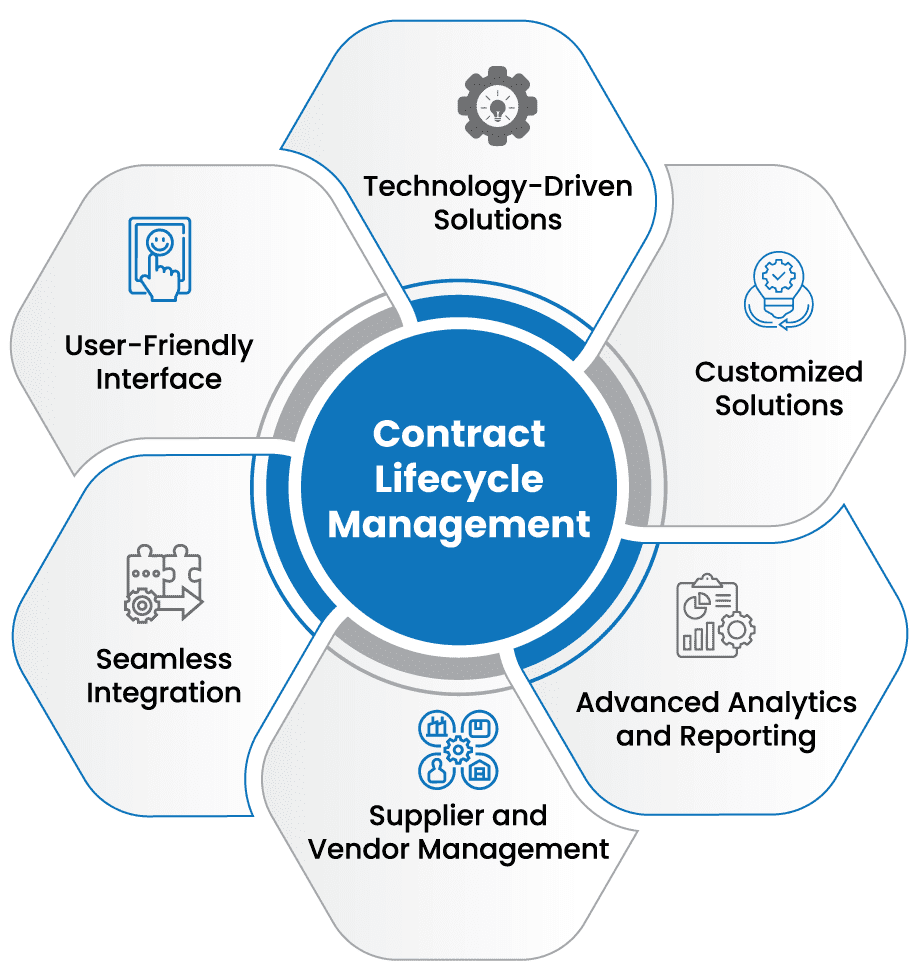 1⃣ Contract Lifecycle Management (CLM) Software
CLM platforms streamline the entire contract process—from creation and approval to execution and renewal. They provide: Pre-approved templates Clause libraries Automated workflows Compliance tracking
Popular CLM Platforms:
-
Ironclad – AI-powered contract automation
-
DocuSign CLM – Seamless e-signature integration
-
Agiloft – No-code contract automation
-
Conga Contracts – Salesforce-compatible CLM
-
ContractWorks – Simple and affordable contract management
2⃣ AI & Natural Language Processing (NLP) for Contract Automation
AI-driven contract review and analysis tools help: Auto-generate contracts based on business inputs Identify risky or non-compliant terms Suggest alternative clauses for negotiations
AI-Powered Legal Tech Tools:
-
Kira Systems – AI contract analysis
-
Evisort – AI-driven contract intelligence
-
Lexion – AI-powered CLM for legal teams
-
Juro – AI-based contract automation for sales & legal
3⃣ Document Automation & No-Code Platforms
These platforms allow non-technical users to build contract workflows without coding: Generate custom contracts by filling a form Auto-insert clauses based on deal conditions Set up approval workflows
Top No-Code Document Automation Tools:
-
PandaDoc – Easy-to-use contract builder
-
AirSlate – Workflow automation for contracts
-
Formstack – No-code contract generation
-
Nintex – Document automation for enterprises
4⃣ E-Signature & Digital Identity Verification
Electronic signatures speed up contract execution and ensure authenticity. Many platforms integrate e-signatures directly into contract workflows.
Popular E-Signature Solutions:
-
DocuSign – Industry leader in e-signatures
-
Adobe Sign – Seamless integration with Adobe products
-
HelloSign (by Dropbox) – Simple and secure e-signing
-
SignNow – Affordable e-signature tool
 Bonus: For extra security, use blockchain-based smart contracts to ensure tamper-proof agreements.
5⃣ API & Cloud Integrations
To create a seamless contract workflow, integrate self-service contracts with: Cloud Storage (Google Drive, Dropbox, OneDrive) CRM & Sales Tools (Salesforce, HubSpot, Microsoft Dynamics) ERP & Procurement Systems (SAP Ariba, Coupa, Oracle)
 HR Platforms (Workday, BambooHR)
Tech Stack Examples:
-
Salesforce + Ironclad + DocuSign → For Sales Teams
-
SAP Ariba + Agiloft + Adobe Sign → For Procurement Teams
-
Workday + PandaDoc + HelloSign → For HR & Employment Contracts
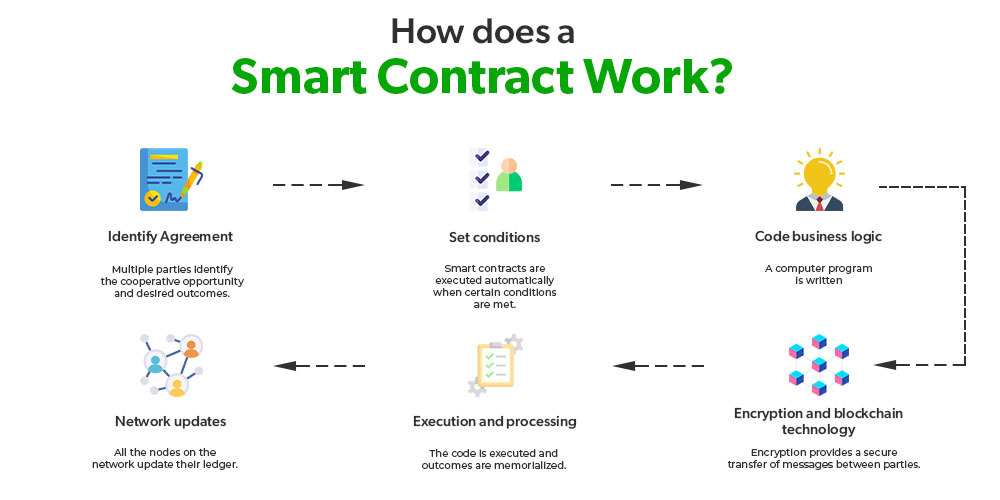
6⃣ Smart Contracts & Blockchain (Advanced)
For high-security contracts, blockchain-powered smart contracts can be used to: Ensure tamper-proof execution Auto-execute agreements when conditions are met
 Enable secure payments & digital transactions
Blockchain-Based Contract Platforms:
-
Ethereum Smart Contracts – Decentralized contract execution
-
Hyperledger Fabric – Enterprise blockchain for legal agreements
-
OpenLaw – Smart contracts for legal automation
Final Thoughts
The best self-service contract solution depends on: Your industry (Legal, Sales, HR, Procurement) The level of automation needed Integration with existing tools (CRM, HR, ERP) Compliance requirements (GDPR, HIPAA, SOC 2)
Would you like me to suggest a tech stack for a specific use case? book consultation